# Read-receipt avatars

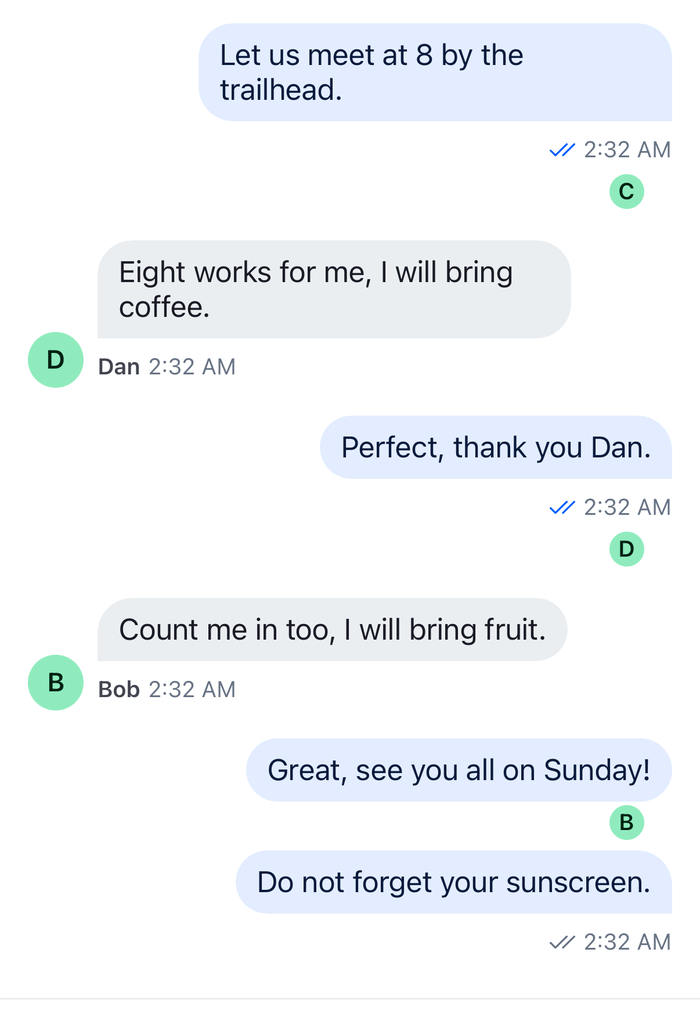
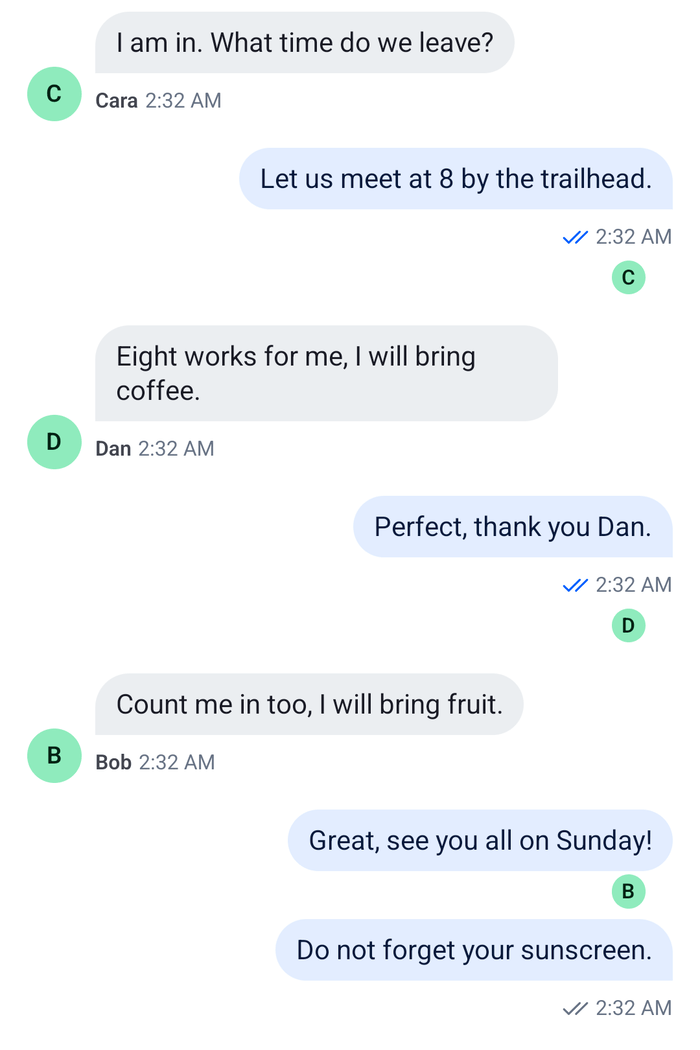
This UI cookbook shows read receipts in the message list as member avatars: a small avatar under each member's last read message, which moves down as the member reads on. The sent, delivered and read marks next to the time are a different UI, which the [Status indicators](https://getstream.io/chat/docs/sdk/react-native/ui-cookbooks/message-list/status-indicators/) UI cookbook changes. Where read positions come from is explained in [Read state, unread and receipts](https://getstream.io/chat/docs/sdk/react-native/features/messaging/read-state-unread-and-receipts/#receipts).

>
> **Note:** **What you'll build**
>
> - A small avatar under each member's last read message
> - Avatars that move down as members read on
>

---

**Approach:** Replace one part. [Choosing where to start](https://getstream.io/chat/docs/sdk/react-native/ui-cookbooks/overview/#choosing-where-to-start) explains the approaches.

## Best practices

- Read the avatars from `channel.messageReceiptsTracker.snapshotStore`. Its `readersByMessageId` lists each member once, at the message their read position is on, which is where the avatar goes.
- Don't use `useMessageReadData()` for this. It lists everyone who has read the message, so a member who read the newest message would show under every message above it too.
- Leave the user out. The tracker counts the user's own read position as well.
- Keep the default message view and add the row after it, so the bubble, the actions and the status keep working as they do.
- Show the row only in the channel's list. Read positions belong to the channel, not to a thread.
- Subscribe in the avatars row and not in the wrapper around the message view, so a read re-renders the rows and not the messages.

## Add the avatars under each message

`ReadReceiptAvatars` reads the readers of the message it renders under, and `MessageWithReadReceipts` puts it after the SDK's `MessageItemView`. The `MessageItemView` key then renders that pair for every message:

```tsx title="src/ReadReceiptAvatars.tsx"
import type { PropsWithChildren } from "react";
import { StyleSheet, View } from "react-native";
import type { MessageReceiptsSnapshot } from "stream-chat";
import {
  MessageItemView,
  UserAvatar,
  useChannel,
  useChatContext,
  useMessageContext,
  useStateStore,
  useThreadContext,
  WithComponents,
} from "stream-chat-react-native";

// The tracker groups members by the message their read position is on.
const readersSelector = ({ readersByMessageId }: MessageReceiptsSnapshot) => ({
  readersByMessageId,
});

/** The avatars of the other members whose last read message is this one. */
const ReadReceiptAvatars = () => {
  const channel = useChannel();
  const { client } = useChatContext();
  const { message } = useMessageContext();
  const { thread } = useThreadContext();
  const { readersByMessageId } = useStateStore(
    channel.messageReceiptsTracker.snapshotStore,
    readersSelector,
  );

  // Read positions belong to the channel's list, so a thread shows none.
  if (thread) return null;

  const readers = (readersByMessageId[message.id] ?? []).filter(
    (user) => user.id !== client.userId,
  );
  if (!readers.length) return null;

  return (
    <View style={styles.row}>
      {readers.map((user) => (
        <UserAvatar key={user.id} size="xs" user={user} />
      ))}
    </View>
  );
};

/** The SDK's message view, with the reader avatars under it. */
const MessageWithReadReceipts = () => (
  <View>
    <MessageItemView />
    <ReadReceiptAvatars />
  </View>
);

// Declared once, so WithComponents gets the same object on every render.
const overrides = { MessageItemView: MessageWithReadReceipts };

export const WithReadReceiptAvatars = ({ children }: PropsWithChildren) => (
  <WithComponents overrides={overrides}>{children}</WithComponents>
);

const styles = StyleSheet.create({
  row: {
    flexDirection: "row",
    gap: 4,
    justifyContent: "flex-end",
    paddingHorizontal: 16,
    paddingVertical: 2,
  },
});
```

Wrap the channel screen in `WithReadReceiptAvatars`:

```tsx title="src/ReadReceiptsChannel.tsx"
import type { Channel as StreamChannel } from "stream-chat";
import {
  Channel,
  MessageComposer,
  MessageList,
} from "stream-chat-react-native";
import { WithReadReceiptAvatars } from "./ReadReceiptAvatars";

export const ReadReceiptsChannel = ({
  channel,
}: {
  channel: StreamChannel;
}) => (
  <WithReadReceiptAvatars>
    <Channel channel={channel}>
      <MessageList />
      <MessageComposer />
    </Channel>
  </WithReadReceiptAvatars>
);
```

<table>
  <tr>
  <td align='center' width='50%'>

![Small avatars of Cara, Dan and Bob under the last message each of them has read on iOS](https://getstream.io/docs-assets/images/04cd0050ff70.png)

  </td>
  <td align='center' width='50%'>

![Small avatars of Cara, Dan and Bob under the last message each of them has read on Android](https://getstream.io/docs-assets/images/0e3dfeecffb9.png)

  </td>
  </tr>
</table>

## How it works

>
> **Info:** **Example**
>
> Three members have read a group chat. One of them stopped at the user's question and the other two read up to the newest message. The first member's avatar sits under the question, and the other two sit under the newest message. When the first member opens the channel and reads on, their avatar moves down to the newest message.
>

1. `channel.messageReceiptsTracker` keeps every member's read position: the last message they read, built from `channel.state.read`. Its `snapshotStore` publishes `readersByMessageId`, which maps a message id to the members whose position is on that message. A member appears under one message only.
2. `ReadReceiptAvatars` subscribes to that store with `useStateStore()`, so it re-renders when a member reads further. Their avatar then leaves the old message and shows under the new one.
3. `useChannel()` returns the channel the message list belongs to, and `useMessageContext()` the message being rendered. `client.userId` filters the user out, since the user's own read position is on the newest message they saw.
4. `Message` renders the `MessageItemView` key for each message. `MessageWithReadReceipts` renders the SDK's `MessageItemView` unchanged and adds the row after it. The message menu moves the whole pair, the row included, while it's open.
5. `useThreadContext().thread` is set inside a `Thread`. Replies have no read positions of their own, so the row isn't rendered there.

The `MessageStatus` marks of the default view stay on the user's own messages. To show who read a message instead of where each member stopped, see the Message Info sheet in [Status indicators](https://getstream.io/chat/docs/sdk/react-native/ui-cookbooks/message-list/status-indicators/#who-read-a-message).

## Read more

- [Read state, unread and receipts](https://getstream.io/chat/docs/sdk/react-native/features/messaging/read-state-unread-and-receipts/#receipts): read positions and how the SDK turns them into receipts.
- [Message receipts tracker](https://getstream.io/chat/docs/sdk/react-native/reference/state/message-receipts-tracker/): `readersByMessageId` and every method of `channel.messageReceiptsTracker`.
- [Status indicators](https://getstream.io/chat/docs/sdk/react-native/ui-cookbooks/message-list/status-indicators/): the marks next to the time, and who read a message.
- [Avatars](https://getstream.io/chat/docs/sdk/react-native/component-reference/base-ui/avatars/): `UserAvatar` and its sizes.
- [Message UI](https://getstream.io/chat/docs/sdk/react-native/ui/components/message-ui/#replacing-parts): the `MessageItemView` key and the other parts of a message.
- [Custom message](https://getstream.io/chat/docs/sdk/react-native/ui-cookbooks/message-list/custom-message/#wrapping-the-default-view): wrapping the default view.

---

For the most recent version of this documentation, visit [https://getstream.io/chat/docs/sdk/react-native/ui-cookbooks/message-list/read-receipt-avatars/](https://getstream.io/chat/docs/sdk/react-native/ui-cookbooks/message-list/read-receipt-avatars/).