# Giphy preview

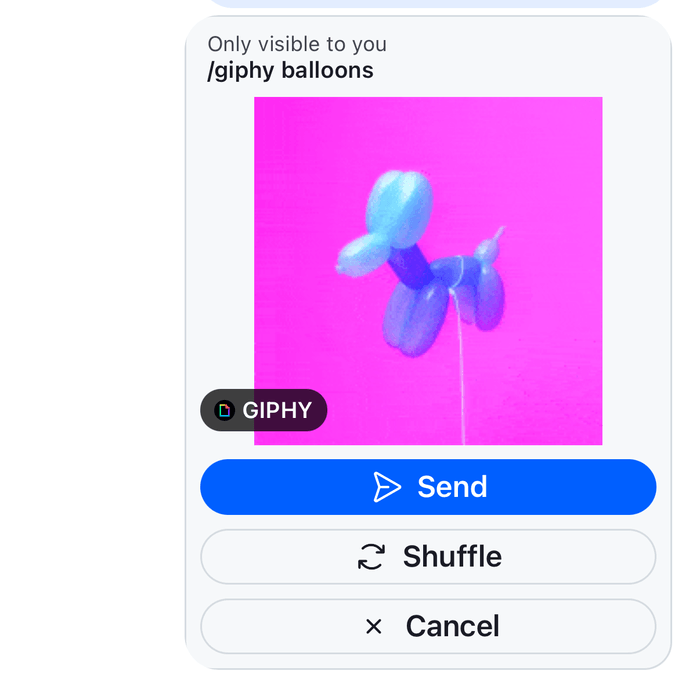
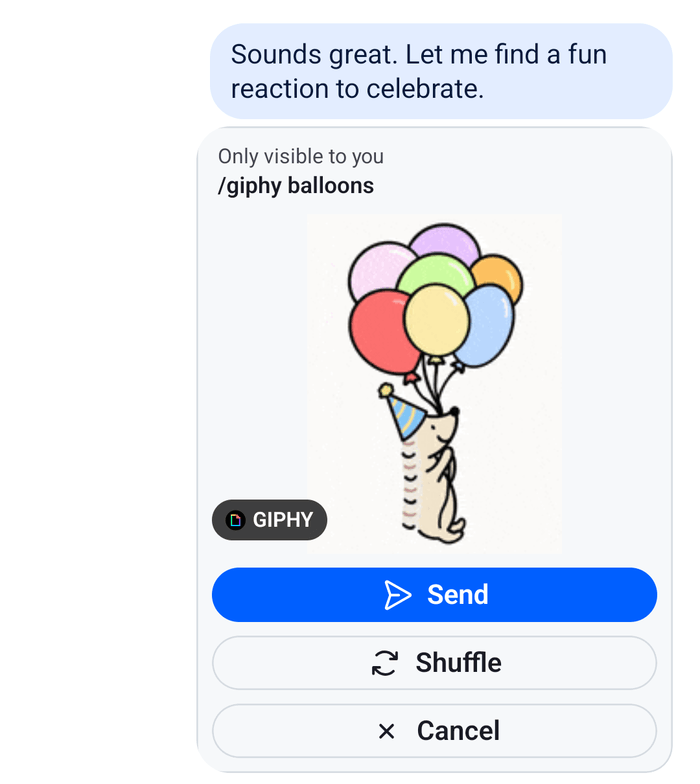
A `/giphy` command answers with a preview that only the user sees, with Send, Shuffle and Cancel buttons. This UI cookbook replaces that preview: it shows the search term above the GIF and puts an icon on each button. How the user sends `/giphy`, and what each button does, is explained in [Commands and Giphy](https://getstream.io/chat/docs/sdk/react-native/features/rich-content/commands-and-giphy/#the-giphy-preview).

>
> **Note:** **What you'll build**
>
> - The search term above the GIF
> - An icon on each of the Send, Shuffle and Cancel buttons
>

---

**Approach:** Replace one part. [Choosing where to start](https://getstream.io/chat/docs/sdk/react-native/ui-cookbooks/overview/#choosing-where-to-start) explains the approaches.

## Best practices

- Replace the preview through the `Giphy` key, and render the SDK's `Giphy` for every attachment that has no `actions`. A GIF that was sent has none, and the SDK renders it.
- Call the `handleAction` from `useMessageContext()` with each action's `name` and `value`. It sends the action and applies the server's answer to the message list.
- Read the labels from the actions, as the default does. The server sends them in English, so translate them yourself if your app has other languages.
- Render the GIF with `GiphyImage`, so the rendition that `giphyVersion` names and the loading and error states keep working.
- Keep the "Only visible to you" line, and take it from the SDK's translation key, so the user knows no one else sees the preview.

## The preview

The `Giphy` key receives the attachment. A preview from `/giphy` has `actions`, a `title` that holds the search term, and the GIF in `giphy`. This component renders the term, the GIF and a button with an icon for each action, on a card. For an attachment without `actions`, it renders the default `Giphy`:

```tsx title="src/GiphyPreview.tsx"
import type { PropsWithChildren } from "react";
import { StyleSheet, Text, View } from "react-native";
import {
  Button,
  Giphy,
  GiphyImage,
  useComponentsContext,
  useMessageContext,
  useTheme,
  useTranslationContext,
  WithComponents,
} from "stream-chat-react-native";
import type { GiphyProps, IconRenderer } from "stream-chat-react-native";

const GiphyPreview = (props: GiphyProps) => {
  const { attachment } = props;
  const { handleAction } = useMessageContext();
  const { icons } = useComponentsContext();
  const { t } = useTranslationContext();
  const {
    theme: { semantics },
  } = useTheme();

  // A GIF that was sent has no actions, and the SDK renders it.
  if (!attachment.actions) return <Giphy {...props} />;

  const actionIcons: Record<string, IconRenderer> = {
    cancel: icons.NewClose,
    send: icons.SendRight,
    shuffle: icons.Reload,
  };

  return (
    <View
      style={[
        styles.card,
        {
          backgroundColor: semantics.backgroundCoreSurfaceSubtle,
          borderColor: semantics.borderCoreDefault,
        },
      ]}
    >
      <Text style={[styles.hint, { color: semantics.textSecondary }]}>
        {t("attachment.giphy.onlyVisibleToYou.text", "Only visible to you")}
      </Text>
      {attachment.title ? (
        <Text style={[styles.query, { color: semantics.textPrimary }]}>
          /giphy {attachment.title}
        </Text>
      ) : null}
      <GiphyImage attachment={attachment} preview />
      <View style={styles.actions}>
        {attachment.actions.map((action) => (
          <Button
            key={action.value}
            LeadingIcon={action.value ? actionIcons[action.value] : undefined}
            label={action.text}
            onPress={() => {
              if (action.name && action.value) {
                handleAction(action.name, action.value);
              }
            }}
            size="sm"
            type={action.value === "send" ? "solid" : "outline"}
            variant={action.value === "send" ? "primary" : "secondary"}
          />
        ))}
      </View>
    </View>
  );
};

// Declared once, so WithComponents gets the same object on every render.
const overrides = { Giphy: GiphyPreview };

export const WithGiphyPreview = ({ children }: PropsWithChildren) => (
  <WithComponents overrides={overrides}>{children}</WithComponents>
);

const styles = StyleSheet.create({
  actions: {
    flexDirection: "row",
    flexWrap: "wrap",
    gap: 8,
    justifyContent: "center",
    padding: 8,
  },
  card: { borderRadius: 16, borderWidth: 1, maxWidth: 280, overflow: "hidden" },
  hint: { fontSize: 12, paddingHorizontal: 12, paddingTop: 8 },
  query: {
    fontSize: 13,
    fontWeight: "600",
    paddingHorizontal: 12,
    paddingBottom: 8,
  },
});
```

<table>
  <tr>
  <td align='center' width='50%'>

![A private giphy preview showing the search term and Only visible to you above the GIF, and Send, Shuffle and Cancel buttons with icons, on iOS](https://getstream.io/docs-assets/images/e9481c01b94a.png)

  </td>
  <td align='center' width='50%'>

![A private giphy preview showing the search term and Only visible to you above the GIF, and Send, Shuffle and Cancel buttons with icons, on Android](https://getstream.io/docs-assets/images/f97ea26bb142.png)

  </td>
  </tr>
</table>

Wrap the screens that render a message list, `Channel` and `Thread`, in `WithGiphyPreview`:

```tsx title="src/GiphyChannel.tsx"
import type { Channel as StreamChannel } from "stream-chat";
import {
  Channel,
  MessageComposer,
  MessageList,
} from "stream-chat-react-native";
import { WithGiphyPreview } from "./GiphyPreview";

export const GiphyChannel = ({ channel }: { channel: StreamChannel }) => (
  <WithGiphyPreview>
    <Channel channel={channel}>
      <MessageList />
      <MessageComposer />
    </Channel>
  </WithGiphyPreview>
);
```

The channel type needs the `giphy` command, as [Commands and Giphy](https://getstream.io/chat/docs/sdk/react-native/features/rich-content/commands-and-giphy/#which-commands-exist) explains. To try the preview, type `/giphy forest` in the composer and send it.

## How it works

>
> **Info:** **Example**
>
> The user sends `/giphy forest` in the Weekend trip channel. A preview with the search term and Send, Shuffle and Cancel appears at the end of the list. Shuffle shows another GIF, and Send posts it to the channel.
>

1. The server answers with an ephemeral message that only the user receives. It has an attachment of type `giphy` with three actions, and it takes the place of the sent `/giphy forest` in the list.
2. `Message` finds that an attachment has actions, so the message can't be long-pressed for the message menu and doesn't render its quoted message. It renders the attachment through the `Attachment` key, which renders the `Giphy` key for an attachment of type `giphy`.
3. `GiphyPreview` renders the card. `GiphyImage` shows the rendition `giphyVersion` names on `Channel`, `fixed_height` by default.
4. Each button calls `handleAction(action.name, action.value)`. `Message` sends it with `Channel.sendAction()` and applies the answer: another GIF after Shuffle, the posted message after Send, and nothing left after Cancel.

The preview renders among the messages in `MessageList` and `MessageFlashList`. A GIF that was sent renders through the same `Giphy` key, without `actions`, which is why the component hands it to the SDK's `Giphy`.

## Read more

- [Commands and Giphy](https://getstream.io/chat/docs/sdk/react-native/features/rich-content/commands-and-giphy/): how the user sends `/giphy` and what each button does.
- [Attachments](https://getstream.io/chat/docs/sdk/react-native/component-reference/message/attachments/#giphy): the props of `Giphy` and `GiphyImage`.
- [Message UI](https://getstream.io/chat/docs/sdk/react-native/ui/components/message-ui/#bubble-content): what a message with attachment actions renders.
- [Overriding components](https://getstream.io/chat/docs/sdk/react-native/ui/components/overriding-components/): how `WithComponents` keys apply.
- [Image gallery](https://getstream.io/chat/docs/sdk/react-native/ui-cookbooks/message-list/image-gallery/): the grid of a message's images and the viewer.
- [Custom message](https://getstream.io/chat/docs/sdk/react-native/ui-cookbooks/message-list/custom-message/): replaces the message view that renders `Attachment`.

---

For the most recent version of this documentation, visit [https://getstream.io/chat/docs/sdk/react-native/ui-cookbooks/message-list/giphy-preview/](https://getstream.io/chat/docs/sdk/react-native/ui-cookbooks/message-list/giphy-preview/).