# Mention actions
> **Info:** This is release candidate documentation for **Stream Chat Angular SDK v8**. For the latest stable version, see the [latest version (v7)](https://getstream.io/chat/docs/sdk/angular/).
In this example, we will demonstrate how to create custom mention actions if a user clicks on or hovers over a mention in a message.
## Custom mention template
You can provide a custom message template to the [`CustomTemplatesService`](https://getstream.io/chat/docs/sdk/angular/v8/services/CustomTemplatesService/):
Create the template (for example in your `AppComponent`):
```html
@{{ user.name || user.id }}
```
The `Message` component will provide the mentioned user in a variable called `user`, the object has a `UserResponse` type (exported by `stream-chat`) and you can use it to display information about the user. Custom user fields are available under `user.custom`.
The `@` character starts a block in Angular templates (Angular 17+), so you need to escape it as `@` when you want to display it.
This template looks and works like the default mention template, however you can add interactions to this element.
Register the template in your TypeScript code (for example in your `AppComponent`).
These are the necessary steps:
- Create a reference to the custom template
- Import the [CustomTemplatesService](https://getstream.io/chat/docs/sdk/angular/v8/services/CustomTemplatesService/)
- Register your custom template
Here is an example file:
```typescript
import {
AfterViewInit,
Component,
TemplateRef,
ViewChild,
} from "@angular/core";
import {
ChatClientService,
ChannelService,
StreamI18nService,
} from "stream-chat-angular";
import {
CustomTemplatesService,
MentionTemplateContext,
} from "stream-chat-angular";
import { environment } from "../environments/environment";
@Component({
selector: "app-root",
templateUrl: "./app.component.html",
styleUrls: ["./app.component.scss"],
})
export class AppComponent implements AfterViewInit {
// Create a reference to the custom template
@ViewChild("mentionTemplate")
private mentionTemplate!: TemplateRef;
constructor(
private chatService: ChatClientService,
private channelService: ChannelService,
private streamI18nService: StreamI18nService,
private customTemplatesService: CustomTemplatesService, // Import the customTemplatesService
) {
void this.chatService.init(
environment.apiKey,
environment.userId,
environment.userToken,
);
void this.channelService.init({
type: "messaging",
members: { $in: [environment.userId] },
});
this.streamI18nService.setTranslation();
}
ngAfterViewInit(): void {
// Register your custom template
this.customTemplatesService.mentionTemplate$.next(this.mentionTemplate);
}
}
```
## Display user information on click
In this step we will create a popover with additional user information that will be displayed if the user clicks on a mention. We are using the [`ngx-popperjs`](https://www.npmjs.com/package/ngx-popperjs) library for the popover, but you can use a different library as well.
### Install `ngx-popperjs`
Let's install the necessary dependency:
```bash
npm install ngx-popperjs --save
```
The latest `ngx-popperjs` release supports Angular 17. For newer Angular versions you can use [`ngx-float-ui`](https://www.npmjs.com/package/ngx-float-ui) (it is already a dependency of `stream-chat-angular`), which has the same API with different names (`NgxFloatUiModule`, `[floatUi]`, ``, `NgxFloatUiTriggers`).
### Import the `NgxPopperjsModule` module
```typescript
import {NgxPopperjsModule} from 'ngx-popperjs';
@NgModule({
// ...
imports: [
// ...
NgxPopperjsModule
]
})
```
### Import SCSS
Add this to your `styles.scss`:
```scss
@use "ngx-popperjs" as popper;
@include popper.ngx-popperjs-theme(white, black);
```
[CSS is also supported.](https://www.npmjs.com/package/ngx-popperjs)
### Create the popover
```html
@{{ user.name || user.id }}
```
The message text element clips overflowing content, so the popover is appended to the `body` with `popperAppendTo="body"`. The `str-chat` class on the popover content applies the SDK's theme variables (for example, the avatar size), since the popover is rendered outside the chat UI.
This is the popover that is displayed if we click on a mention in a message:
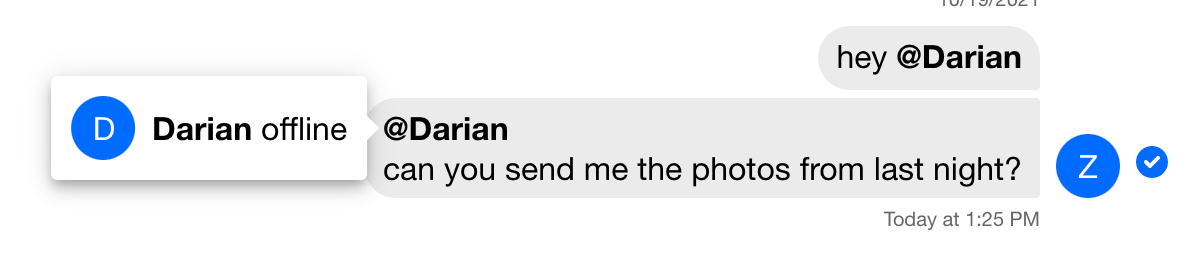
[`ngx-popperjs`](https://www.npmjs.com/package/ngx-popperjs) has a lot of other configuration options, feel free to explore those.
## Display user information on hover
Let's modify our solution and display the popover on hover instead of click:
We need to add a variable to our component class:
```typescript
import { NgxPopperjsTriggers } from "ngx-popperjs";
popoverTrigger = NgxPopperjsTriggers.hover;
```
And modify our template:
```html
@{{ user.name || user.id }}
```
---
For the most recent version of this documentation, visit [https://getstream.io/chat/docs/sdk/angular/v8/code-examples/mention-actions/](https://getstream.io/chat/docs/sdk/angular/v8/code-examples/mention-actions/).