# Channel invites
> **Info:** This is release candidate documentation for **Stream Chat Angular SDK v8**. For the latest stable version, see the [latest version (v7)](https://getstream.io/chat/docs/sdk/angular/).
This guide gives you a step-by-step tutorial on how to use [channel invites](https://getstream.io/chat/docs/javascript/channel-invites/) in your chat application.
## Invite button
The [`CustomTemplatesService`](https://getstream.io/chat/docs/sdk/angular/v8/services/CustomTemplatesService/) has a property called `channelActionsTemplate$` that can be used to add action buttons to the [channel header](https://getstream.io/chat/docs/sdk/angular/v8/components/ChannelHeaderComponent/).
Let's create a component for the invite button that we'll add to the channel header:
```bash
ng g c invite-button
```
### HTML template
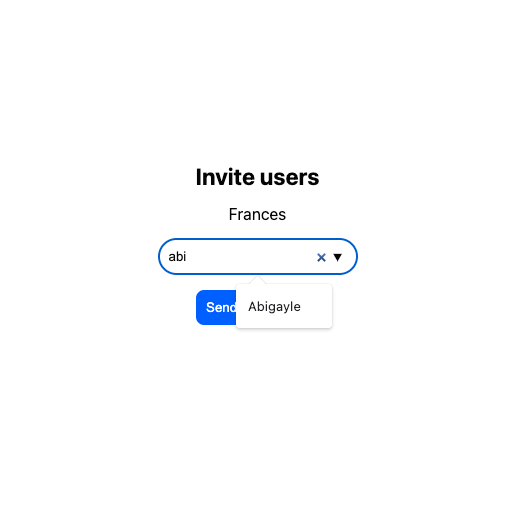
We create a simplistic UI with an "Invite users" button that opens a [modal](https://getstream.io/chat/docs/sdk/angular/v8/components/ModalComponent/) where users can search for other users in the application. The [`NotificationList` component](https://getstream.io/chat/docs/sdk/angular/v8/components/NotificationListComponent/) is used to display any error messages that may occur during the invite request.
```html
Invite users
{{ u.name || u.id }}
```
### Styling
We are using stream-chat theme variables to match the default chat theme. You can read more about theme variables in our [theming guide](https://getstream.io/chat/docs/sdk/angular/v8/theming/themingv2/).
```scss
.modal-content {
width: 600px;
padding: 30px;
display: flex;
align-items: center;
justify-content: center;
flex-direction: column;
gap: 15px;
.title {
font-size: 23px;
font-weight: 700;
}
input {
width: 200px;
padding: 10px;
border: none;
background-color: var(--str-chat__message-textarea-background-color);
color: var(--str-chat__message-textarea-color);
border-radius: var(--str-chat__message-textarea-border-radius);
border-block-start: var(--str-chat__message-textarea-border-block-start);
border-block-end: var(--str-chat__message-textarea-border-block-end);
border-inline-start: var(--str-chat__message-textarea-border-inline-start);
border-inline-end: var(--str-chat__message-textarea-border-inline-end);
}
.invited-users {
text-align: center;
}
.add {
margin-left: 5px;
}
.notifications {
width: 100%;
}
}
button {
background-color: var(--str-chat__cta-button-background-color);
border: none;
border-radius: var(--str-chat__cta-button-border-radius);
color: var(--str-chat__cta-button-color);
padding: 10px;
cursor: pointer;
}
```
### Component logic
Let's break down the most important parts of the component's logic:
- We define an input with the type `Channel` to access the current active channel - this will be provided by the [`ChannelHeader`](https://getstream.io/chat/docs/sdk/angular/v8/components/ChannelHeaderComponent/) component
- We check if the current user has the `update-channel-members` [capability](https://getstream.io/chat/docs/node/chat-permission-policies/) to see if they can invite members (it's important to note that [not every channel can be extended with new members](https://getstream.io/chat/docs/javascript/creating-channels/#distinct-channels))
- The `autocompleteUsers` method of the [`ChatClientService`](https://getstream.io/chat/docs/sdk/angular/v8/services/ChatClientService/) can be used to search for users in the application
- The `inviteMembers` method of the `Channel` can be used to invite one or more members to the channel
- The [`NotificationService`](https://getstream.io/chat/docs/sdk/angular/v8/services/NotificationService/) can be used to notify the user about the result of the invite request
```typescript
import {
Component,
ElementRef,
Input,
OnChanges,
OnInit,
SimpleChanges,
ViewChild,
} from "@angular/core";
import { fromEvent } from "rxjs";
import { debounceTime, switchMap } from "rxjs/operators";
import { Channel, UserResponse } from "stream-chat";
import { ChatClientService, NotificationService } from "stream-chat-angular";
@Component({
selector: "app-invite-button",
templateUrl: "./invite-button.component.html",
styleUrls: ["./invite-button.component.scss"],
})
export class InviteButtonComponent implements OnInit, OnChanges {
@Input() channel?: Channel;
usersToInvite: UserResponse[] = [];
canInviteUsers = false;
isModalOpen = false;
autocompleteOptions: UserResponse[] = [];
@ViewChild("input", { static: true })
private input!: ElementRef;
constructor(
private chatClientService: ChatClientService,
private notificationService: NotificationService,
) {}
ngOnInit(): void {
fromEvent(this.input.nativeElement, "input")
.pipe(
debounceTime(300),
switchMap(() =>
this.chatClientService.autocompleteUsers(
this.input.nativeElement.value,
),
),
)
.subscribe((users) => (this.autocompleteOptions = users));
}
ngOnChanges(changes: SimpleChanges): void {
if (changes.channel && this.channel) {
this.canInviteUsers = (
this.channel.data?.own_capabilities as string[]
).includes("update-channel-members");
this.usersToInvite = [];
this.autocompleteOptions = [];
}
}
async inviteMembers() {
try {
await this.channel?.inviteMembers({
members: this.usersToInvite.map((u) => u.id),
});
this.notificationService.addTemporaryNotification(
"User(s) successfully invited",
"success",
);
this.usersToInvite = [];
this.autocompleteOptions = [];
this.isModalOpen = false;
} catch {
this.notificationService.addTemporaryNotification(
`User(s) couldn't be invited`,
"error",
);
}
}
addUser() {
const inputValue = this.input.nativeElement.value;
const user = this.autocompleteOptions.find(
(u) => u.id === inputValue || u.name === inputValue,
);
if (user) {
this.usersToInvite.push(user);
this.input.nativeElement.value = "";
this.autocompleteOptions = [];
}
}
}
```
### Providing the invite button to the channel header
Lastly, we provide the `InviteButton` component to the `ChannelHeader`.
Create the template (for example in your `AppComponent`):
```html
```
Register the template in your TypeScript code (for example in your `AppComponent`).
These are the necessary steps:
- Create a reference to the custom template
- Import the [CustomTemplatesService](https://getstream.io/chat/docs/sdk/angular/v8/services/CustomTemplatesService/)
- Register your custom template
```typescript
import {
AfterViewInit,
Component,
TemplateRef,
ViewChild,
} from "@angular/core";
import {
ChatClientService,
ChannelService,
StreamI18nService,
} from "stream-chat-angular";
import {
CustomTemplatesService,
ChannelActionsContext,
} from "stream-chat-angular";
import { environment } from "../environments/environment";
@Component({
selector: "app-root",
templateUrl: "./app.component.html",
styleUrls: ["./app.component.scss"],
})
export class AppComponent implements AfterViewInit {
// Create a reference to the custom template
@ViewChild("channelActionsTemplate")
private channelActionsTemplate!: TemplateRef;
constructor(
private chatService: ChatClientService,
private channelService: ChannelService,
private streamI18nService: StreamI18nService,
private customTemplatesService: CustomTemplatesService, // Import customTemplatesService
) {
void this.chatService.init(
environment.apiKey,
environment.userId,
environment.userToken,
);
void this.channelService.init({
type: "messaging",
members: { $in: [environment.userId] },
});
this.streamI18nService.setTranslation();
}
ngAfterViewInit(): void {
// Register your custom template
this.customTemplatesService.channelActionsTemplate$.next(
this.channelActionsTemplate,
);
}
}
```
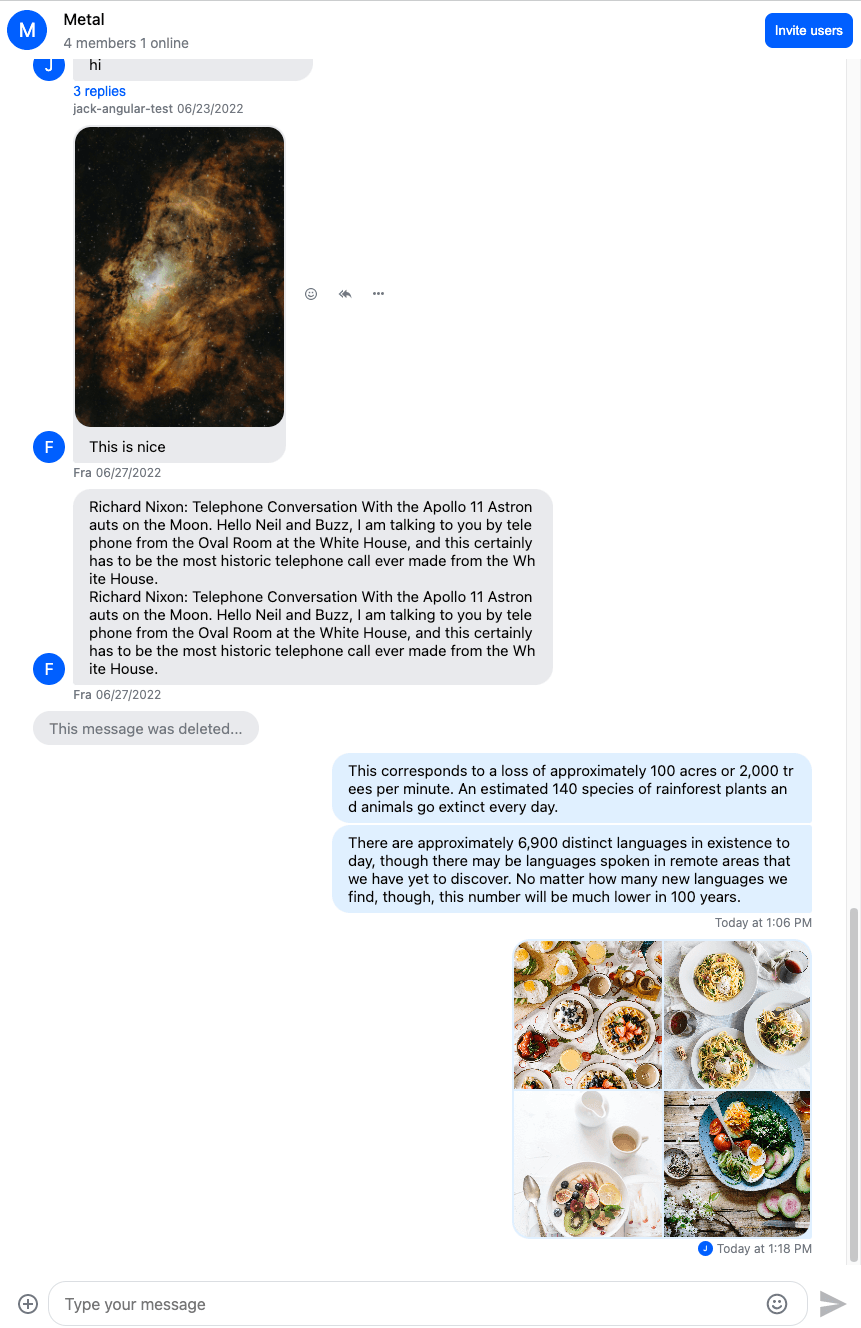
This is how the channel header looks with the invite button present:
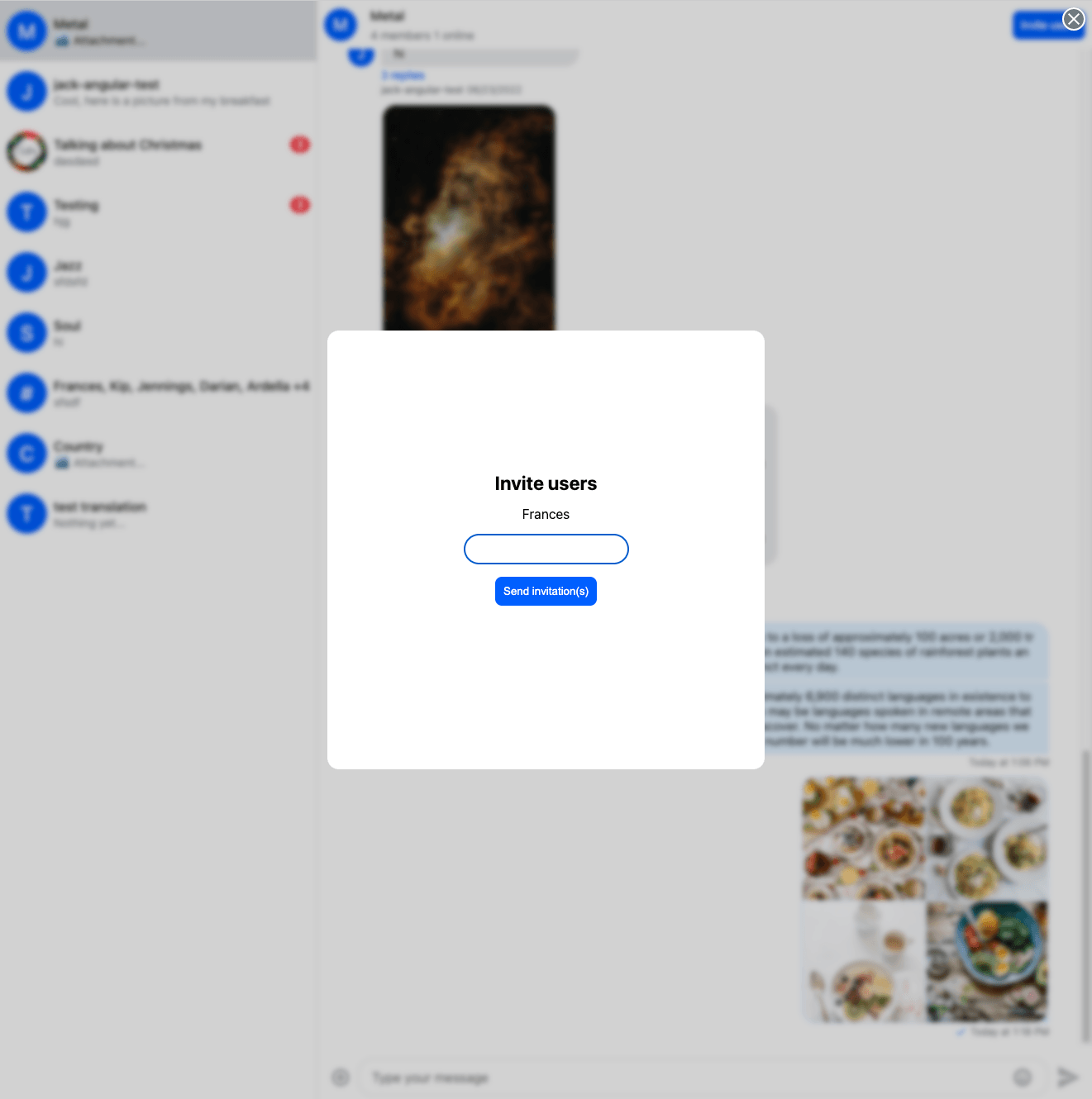
And this is how the invite modal turned out:
## Pending invitations
The next step is to show the pending invitations to the user.
### Invitation notification component
First we create a component that will display a pending invitation:
```bash
ng g c invitation --inline-template --inline-style
```
Here are the most important parts of the component:
- The component will be displayed inside the [`NotificationList`](https://getstream.io/chat/docs/sdk/angular/v8/components/NotificationListComponent/) component
- We create an input with `Channel` type, this will be provided by the `NotificationList`
- We create an input called `dismissFn`, this will also be provided by the `NotificationList` and can be used to dismiss the notification
- The invite can be accepted with the `acceptInvite` method of the `channel`
- The invite can be rejected with the `rejectInvite` method of the `channel`
The component:
```typescript
import { Component, Input, OnInit } from "@angular/core";
import { Channel } from "stream-chat";
import { NotificationService } from "stream-chat-angular";
@Component({
selector: "app-invitation",
template: `
You have been invited to the
{{ channelName }} channel. |
|
`,
styles: [
"button {border: none; background-color: transparent; color: var(--blue); font-weight: bold; cursor: pointer}",
],
})
export class InvitationComponent implements OnInit {
@Input() channel?: Channel;
@Input() dismissFn!: Function;
constructor(private notificationService: NotificationService) {}
ngOnInit(): void {}
accept() {
this.sendRequest("accept");
}
async decline() {
this.sendRequest("reject");
}
get channelName() {
return this.channel?.data?.custom?.name || this.channel?.id;
}
private async sendRequest(answer: "accept" | "reject") {
const request =
answer === "accept"
? async () => await this.channel?.acceptInvite()
: async () => await this.channel?.rejectInvite();
try {
await request();
this.dismissFn();
this.notificationService.addTemporaryNotification(
`Invite from ${this.channelName} successfully ${answer}ed`,
"success",
);
} catch {
this.notificationService.addTemporaryNotification(
`An error occurred during ${answer}ing the invitation from ${this.channelName}`,
"error",
);
}
}
}
```
### Displaying the invitations
The next step will be to display the invitations.
#### Invitation template
We will have to create the invitation template that can be passed to the [`NotificationList`](https://getstream.io/chat/docs/sdk/angular/v8/components/NotificationListComponent/) component.
Add this to your `app.component.html` file:
```html
```
Add a reference to the template in your `app.component.ts`:
```typescript
@ViewChild('inviteTemplate') private inviteTemplate!: TemplateRef<{channel: Channel | ChannelResponse}>;
```
#### Displaying the invitations
The [`ChatClientService`](https://getstream.io/chat/docs/sdk/angular/v8/services/ChatClientService/) can keep track of pending invites, to enable this you have to initialize the service with the following flag:
```typescript
this.chatService.init("", "", "", {
trackPendingChannelInvites: true,
});
```
The `pendingInvites$` Observable on the [`ChatClientService`](https://getstream.io/chat/docs/sdk/angular/v8/services/ChatClientService/) can notify us about the pending invitations of the current user. Let's subscribe to this Observable and [display the invites](https://getstream.io/chat/docs/sdk/angular/v8/services/NotificationService/) in the `ngOnInit` method of the `app.component.ts`
```typescript
ngOnInit(): void {
this.chatService.pendingInvites$.pipe(pairwise()).subscribe((pair) => {
const [prevInvites, currentInvites] = pair;
const notShownInvites = currentInvites.filter(
(i) => !prevInvites.find((prevI) => prevI.cid === i.cid)
);
notShownInvites.forEach((i) =>
this.notificationService.addPermanentNotification(
this.inviteTemplate,
'info',
undefined,
{ channel: i }
)
);
});
}
```
The above method will display all the pending invitations on page load and display every new invitation received later.
This is how the invitation notifications look like:

## Channel list
### Channel filter
If a user is invited to a channel they immediately become member of the channel (the membership applies even if the invite is rejected).
This means that if you use a channel filter that is based on membership (for example `{members: {$in: []}}`), channels with pending and rejected invites will be returned and displayed in the channel list as well.
If this is not what you need, you can use the [`joined`](https://getstream.io/chat/docs/javascript/query-channels/#channel-queryable-built-in-fields) flag to only list channels that the user was directly added to or the invitation was accepted by the user.
The channel filter can be provided to the `init` method of the [`ChannelService`](https://getstream.io/chat/docs/sdk/angular/v8/services/ChannelService/), here is an example:
```typescript
this.channelService.init({
joined: true,
});
```
### `notification.added_to_channel` event
It's important to note that the filtering set above is not applied to [events](https://getstream.io/chat/docs/javascript/event-object/) which means that you'll have to override the [default channel list behavior](https://getstream.io/chat/docs/sdk/angular/v8/services/ChannelService/#channels) if you don't want channels with pending invites to be added to the channel list when a `notification.added_to_channel` event is received.
To override the default behavior create a custom event handler in `app.component.ts` that checks if the user was invited to the channel or added directly and only adds the channel to the list if the user was added directly:
```typescript
private async customAddedToChannelNotificationHandler(
clientEvent: ClientEvent,
channelListSetter: (channels: Channel[]) => void
) {
const event = clientEvent.event;
if (event.type !== 'notification.added_to_channel' || event.member?.invited) {
return;
}
const channelResponse = event.channel;
const newChanel = this.chatService.chatClient.channel(
channelResponse.type,
channelResponse.id
);
try {
await newChanel.watch();
const existingChannels = this.channelService.channels;
channelListSetter([newChanel, ...existingChannels]);
} catch (error) {
console.error('Failed to watch channel', error);
}
}
```
Now register the handler to the [channel service](https://getstream.io/chat/docs/sdk/angular/v8/services/ChannelService/) in the constructor of `app.component.ts`:
```typescript
this.channelService.customAddedToChannelNotificationHandler =
this.customAddedToChannelNotificationHandler.bind(this);
```
### `notification.invite_accepted` event
The `notification.invite_accepted` event emitted by the [`ChatClientService`](https://getstream.io/chat/docs/sdk/angular/v8/services/ChatClientService/) signals that the user accepted an invitation to a channel, we should add the channel to the channel list, we can do this by re-initializing the channel list.
Add this to the constructor of your `app.component.ts`:
```typescript
this.chatService.events$
.pipe(filter((n) => n.eventType === "notification.invite_accepted"))
.subscribe(() => {
this.channelService.reset();
void this.channelService.init({
joined: true,
});
});
```
If you're doing this in a component other than `AppComponent`, don't forget to unsubscribe from the `events$` Observable.
---
For the most recent version of this documentation, visit [https://getstream.io/chat/docs/sdk/angular/v8/code-examples/channel-invites/](https://getstream.io/chat/docs/sdk/angular/v8/code-examples/channel-invites/).