# Custom attachments
The Stream API allows you to add any attachment to a message. The SDK supports some common types (such as images, videos, etc.) out-of-the-box, but you have to provide your own template to display others.
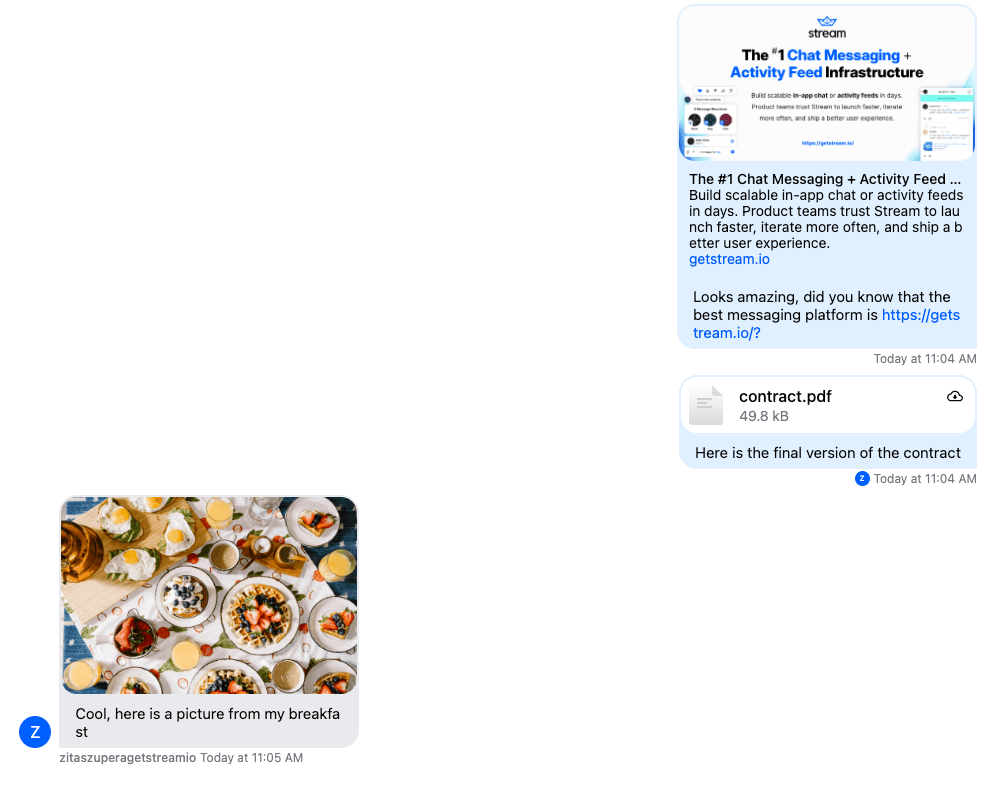
The Angular SDK has out-of-the-box support for the following types:
- Images (including GIFs) are displayed inline
- Videos are displayed inline
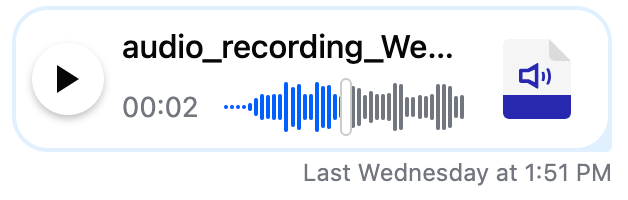
- Voice recordings are displayed inline
- Other files can be downloaded
- Links in a message are enriched with built-in open graph URL scraping
**Example 1** - different type of attachments:
**Example 2** - voice recording:
This guide will show you how to create custom attachments. In the example, we'll allow users to make payment links to send money to each other, but the same logic works for any attachment.
## Creating the attachment
Let's add a button to the message input component to make a payment link. How we create the attachment doesn't matter; the important part is to create an `Attachment` object we can provide to the [`AttachmentService`](https://getstream.io/chat/docs/sdk/angular/services/AttachmentService).
```html showLineNumbers
```
To get type checks for the custom properties of your attachment make sure you define the `CustomAttachmentData` interface:
```ts
import { DefaultAttachmentData } from "stream-chat-angular";
declare module "stream-chat" {
interface CustomAttachmentData extends DefaultAttachmentData {
subtype?: "payment";
value?: string;
paymentLink?: string;
}
}
```
For more information please see the [custom types guide](https://getstream.io/chat/docs/sdk/angular/concepts/custom-types/)
```typescript showLineNumbers
createPaymentLink(attachmentService: AttachmentService) {
const attachment: Attachment = {
type: 'custom',
subtype: 'payment',
value: `${Math.ceil(Math.random() * 99)}$`,
paymentLink: 'pay/me/or/else',
};
// Insert the attachment to the list of custom attachments
attachmentService.customAttachments$.next([
...attachmentService.customAttachments$.value,
attachment,
]);
}
```

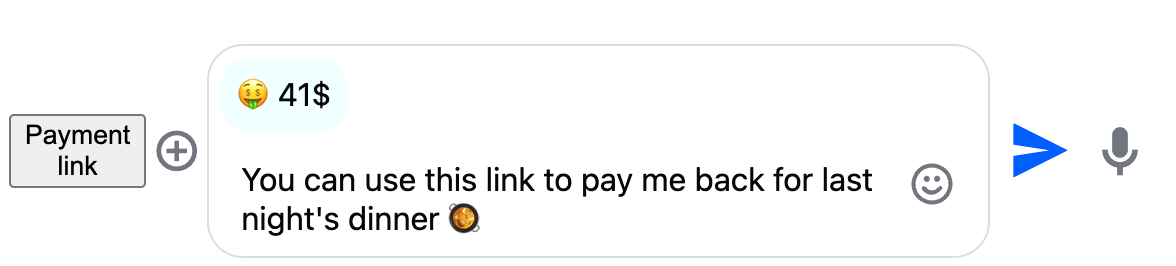
Clicking the "Payment link" will add the attachment to the message, but we don't yet have any visual indicator of this.
## Custom attachment preview
Let's add a preview of the payment attachment.
To do this, we define the HTML template code for the preview that uses the `AttachmentService` to display the previews of the custom attachments:
```html showLineNumbers
🤑 {{ attachment.value }}
```
Note: if you're using standalone components, you need to import the `CommonModule` into your component.
If you have multiple different types of custom attachments, you can display them all here.
Next, we register the template for the `customAttachmentPreviewListTemplate$` field of the [`CustomTemplatesService`](https://getstream.io/chat/docs/sdk/angular/services/CustomTemplatesService):
```typescript showLineNumbers {8-10}
export class AppComponent implements AfterViewInit {
@ViewChild("customAttachmentPreviews")
customAttachmentPreviewsTemplate!: TemplateRef;
constructor(private customTemplatesService: CustomTemplatesService) {}
ngAfterViewInit(): void {
this.customTemplatesService.customAttachmentPreviewListTemplate$.next(
this.customAttachmentPreviewsTemplate,
);
}
}
```
If we click the "Payment link" button, the preview is now visible:
## Delete attachment preview
Let's allow deleting a payment link by extending the template of the preview:
```html showLineNumbers {10-11}
🤑 {{ attachment.value }}
```
This is the implementation of the delete payment attachment method:
```typescript showLineNumbers {5-8}
deletePaymentLink(
attachment: Attachment,
attachmentService: AttachmentService
) {
attachmentService.customAttachments$.next(
attachmentService.customAttachments$.value.filter(
(a) => a.paymentLink !== attachment.paymentLink
)
);
}
```
## Loading state
Sometimes, creating attachments happens asynchronously. If that's the case, you should disable message sending while the attachment is processing.
Here is how you can do that by extending the `createPaymentLink` method:
```typescript showLineNumbers {2-5,23-26}
async createPaymentLink(attachmentService: AttachmentService) {
// Increment the upload counter to disable message send
attachmentService.attachmentUploadInProgressCounter$.next(
attachmentService.attachmentUploadInProgressCounter$.value + 1
);
const attachment: Attachment = {
type: 'custom',
subtype: 'payment',
value: `${Math.ceil(Math.random() * 99)}$`,
paymentLink: '',
};
// simulate network call
await new Promise((resolve) => {
setTimeout(() => {
attachment.paymentLink = 'pay/me/or/else';
resolve();
}, 2000);
});
attachmentService.customAttachments$.next([
...attachmentService.customAttachments$.value,
attachment,
]);
// Attachment is ready, decrease the upload counter
attachmentService.attachmentUploadInProgressCounter$.next(
attachmentService.attachmentUploadInProgressCounter$.value - 1
);
}
```
## Custom attachment inside the message list
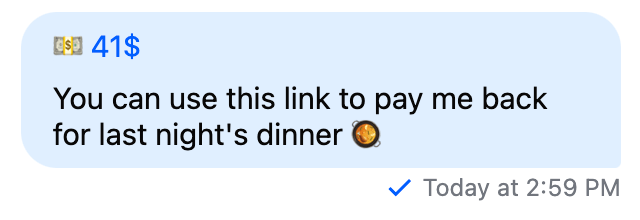
The last missing step is to display the payment link inside the message list. This will be very similar to how we created the attachment preview.
First, let's define an HTML template:
```html showLineNumbers
```
The `attachments` template variable will contain the list of custom attachments.
By default the SDK will treat all `image`, `file`, `giphy`, `video` and `voiceRecording` attachments as built-in. All other type of attachments are treated as custom attachments.
If you want to change the filtering logic, provide your own implementation using the `filterCustomAttachment` method of the [`MessageService`](https://getstream.io/chat/docs/sdk/angular/services/MessageService/#filtercustomattachment).
Next, we register the template for the `customAttachmentListTemplate$` field of the [`CustomTemplatesService`](https://getstream.io/chat/docs/sdk/angular/services/CustomTemplatesService):
```typescript showLineNumbers {8-10}
export class AppComponent implements AfterViewInit {
@ViewChild("customAttachments")
customAttachmentsTemplate!: TemplateRef;
constructor(private customTemplatesService: CustomTemplatesService) {}
ngAfterViewInit(): void {
this.customTemplatesService.customAttachmentListTemplate$.next(
this.customAttachmentsTemplate,
);
}
}
```
This is how the attachment looks like inside the message list:
If you need reference to the message ID (and parent message ID for thread replies) the attachments belong to, this is how you can access them:
```html showLineNumbers {4-5}
```
---
This page was last updated at 2026-08-10T16:00:44.326Z.
For the most recent version of this documentation, visit [https://getstream.io/chat/docs/sdk/angular/guides/custom-attachments/](https://getstream.io/chat/docs/sdk/angular/guides/custom-attachments/).