# Custom Ranking
Stream allows you to configure your own ranking method. You can add multiple ranking methods to a given Flat feed group.
Ranked feeds are only available on [Standard plans](https://getstream.io/activity-feeds/pricing/) and higher. Contact support after upgrading your account to enable ranked feeds for your organization.
An example ranking config is shown below:
```text
{
"score": "decay_linear(time) * popularity ^ 0.5",
"defaults": {
"popularity": 1
}
}
```
### Available Functions
obs: functions are parsed in lowercase
| name | description |
| ------------------------------ | ----------------------------------------------------------------------------------------------------------------------------------------------------------------------------------------------------------------------------------------------------------------------------------------------------------- |
| Basic Arithmetic | The following are supported: + - \* / ( ) ^ |
| ln(x) | Log Function natural base |
| log(x) | Log Function base 10 |
| sin(x) | Trigonometric sine function |
| cos(x) | Trigonometric cosine function |
| tan(x) | Trigonometric tangent function |
| abs(x) | Absolute value |
| min(a,b) | Minimum value |
| max(a,b) | Maximum value |
| trunc(x) | Truncates to the nearest integer value |
| round(x) | Rounds to the nearest integer value |
| decay_linear(t) | Linear Decay |
| decay_exp(t) | Exponential Decay |
| decay_gauss(t) | Gauss Decay |
| rand_normal() | Returns a normally distributed number in the range [-inf, +inf] with standard normal distribution (stddev = 1, mean = 0) |
| rand_normal(a,b,σ,µ) | Returns a normally distributed number in the range [a, b] with specific normal distribution (stddev = σ, mean = µ) |
| rand() | Returns a random number in the range [0, 1.0) |
| rand(a,b) | Returns a random number in the range [a, b) |
| to_unix_timestamp(t) | Converts a time value to a unix timestamp |
| dist(lat1,lng1,lat2,lng2,unit) | Returns the distance between the two points given by (lat1,lng1) and (lat2,lng2) . By default the unit is in kilometers, but the unit can also be M for miles or N nautical miles. This function can be combined with the external ranking parameters to rank activities based on a users distance to them. |
### Operators
The scoring algorithm has support for simple control flows and logical operators.
- Logical operators `&&` and `||`
- Ternary conditional `x ? y : z`
- Control order of evaluation with parens `()`
This lets you construct a scoring algorithm like this
```text
"score":"(a > 2 || (b > 4 && c > 3)) ? 1 : -1"
```
### Adding Activities
Below is an example of how to add activities with custom ranking:
```csharp
// Instantiate a feed object
var userFeed1 = client.Feed("user", "1");
// Add an activity to the feed, where actor, object and target are references to objects - adding your ranking method as a parameter (in this case, "popularity"):
var activity = new Activity("User:2", "pin", "Place:42")
{
Target = "Board:1"
};
activity.SetData("popularity", 5);
var activityResponse = await userFeed1.AddActivityAsync(activity)
```
```js
// Server-Side: Instantiate a feed using feed class 'user' and user id '1'
const user1 = client.feed("user", "1");
// Client-Side: Instantiate a feed for feed group 'user', user id '1' and a security token generated server side
const user1 = client.feed("user", "1", token);
// Add an activity to the feed - adding your ranking method as a parameter (in this case, "popularity"):
const activity = {
actor: "User:2",
verb: "pin",
object: "Place:42",
target: "Board:1",
popularity: 5,
};
// Add Activity
await user1.addActivity(activity);
```
```python
# Instantiate a feed object
user_feed_1 = client.feed('user', '1')
# Add an activity to the feed, where actor, object and target are references to objects - adding your ranking method as a parameter (in this case, "popularity"):
activity_data = { "actor": "User:2", "verb": "pin", "object": "Place:42", "target": "Board:1", "popularity": 5 }
activity_response = user_feed_1.add_activity(activity_data)
```
```ruby
# Instantiate a feed object
user_feed_1 = client.feed('user', '1')
# Add an activity to the feed - where actor, object, and target are references to objects - adding your ranking method as a parameter (in this case, "popularity"):
activity_data = { :actor => "User:2", :verb => "pin", :object => "Place:42", :target => "Board:1", :popularity => 5 }
activity_response = user_feed_1.add_activity(activity_data)
```
```php
// Instantiate a feed object
$userFeed1 = $client->feed('user', '1');
// Add an activity to the feed, where actor, object and target are references to objects - and adding your ranking method as a parameter (in this case, "popularity"):
$data = [
"actor" =>"User:2",
"verb" =>"pin",
"object" =>"Place:42",
"target" =>"Board:1",
"popularity" => 5,
];
$userFeed1->addActivity($data);
```
```java
// Add an activity to the feed, where actor, object and target are references to objects - adding your ranking method as a parameter (in this case, "popularity"):
Activity activity = Activity.builder()
.actor("User:1")
.verb("pin")
.object("place:42")
.target("board:1")
.extraField("popularity", 5)
.build();
userFeed.addActivity(activity).join();
```
```go
// Instantiate a feed object
userFeed, err := client.FlatFeed("user", "42")
if err != nil {
panic(err)
}
// Add an activity to the feed, where actor, object and target are references to objects - adding your ranking method as a parameter (in this case, "popularity"):
activity := stream.Activity{
Actor: "user:42",
Verb: "pin",
Object: "place:42",
Target: "board:1",
Extra: map[string]any{
"popularity": 5,
},
}
_, err = userFeed.AddActivity(context.TODO(), activity)
if err != nil {
panic(err)
}
```
### Retrieving Activities
Below is an example of how to retrieve activities sorted by custom ranking:
```csharp
// Get activities sorted by the ranking method labelled 'activity_popularity' (Ranked Feeds Enabled)
var result = await userFeed1.GetFlatActivitiesAsync(GetOptions.Default.WithLimit(5).WithRanking("activity_popularity"));
```
```js
// Get activities sorted by the ranking method labelled 'activity_popularity' (Ranked Feeds Enabled)
const response = await user1.get({ limit: 20, ranking: "activity_popularity" });
```
```python
# Get activities sorted by the ranking method labelled 'activity_popularity' (Ranked Feeds Enabled)
result = user_feed_1.get(limit=5, ranking="activity_popularity")
```
```ruby
# Get activities sorted by the ranking method labelled 'activity_popularity' (Ranked Feeds Enabled)
result = user_feed_1.get(:limit=>5, :ranking=>'activity_popularity')
```
```php
// Get 5 activities - using limit, offset - and sorted by the ranking method labelled 'activity_popularity' (Ranked Feeds Enabled):
$options = ['ranking' => 'activity_popularity'];
$results = $userFeed1->getActivities(0, 5, $options);
```
```java
// Get activities sorted by the ranking method labelled 'activity_popularity' (Ranked Feeds Enabled)
response = userFeed.getActivities(new Pagination().limit(5), "activity_popularity").join();
```
```go
// Get activities sorted by the ranking method labelled 'activity_popularity' (Ranked Feeds Enabled)
resp, err := userFeed.GetActivitiesWithRanking(
context.TODO(),
"activity_popularity",
stream.WithActivitiesLimit(5),
)
if err != nil {
panic(err)
}
for _, activity := range resp.Results {
fmt.Println(activity)
// ...
}
```
You can only use **limit** and **offset** for pagination with custom ranking.
Configuring ranking can be complex. Feel free to reach out to [support](https://getstream.io/contact/support/) if you have questions.
## More visibility into ranking variables
If you need to inspect your ranking variables at runtime this can be achieved like so
```python
result = user_feed_1.get(ranking="activity_popularity", limit=5, withScoreVars=True)
```
```php
$results = $userFeed1->getActivities(0, 5, $options=['ranking' => 'activity_popularity', 'withScoreVars' => true]);
```
```js
const response = await user1.get({
limit: 20,
ranking: "activity_popularity",
withScoreVars: true,
});
```
## Decay & Ranking
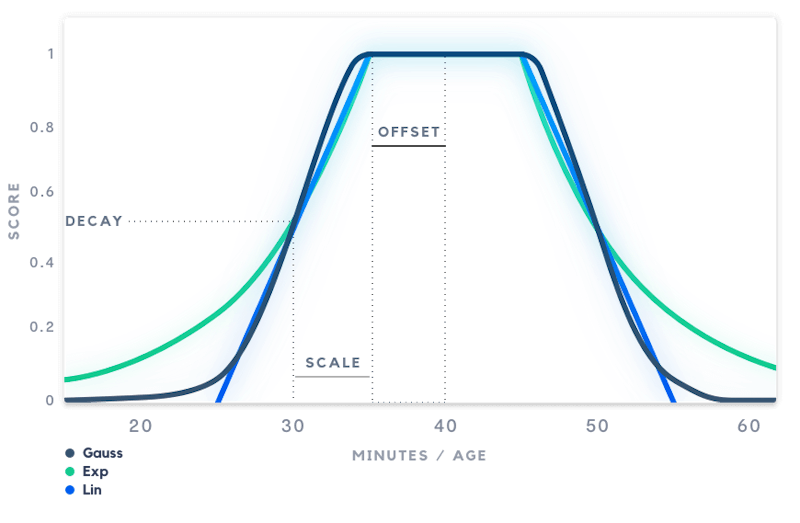
Stream supports a Linear, Exponential, and Gauss decay. For each decay function, we support 4 arguments: Origin, Scale, Offset, and Decay. You can pass either a timedelta string (such as 3d, 4w), or a numeric value.
### Parameters
| name | description | default |
| --------- | -------------------------------------------------------------------------------------------------------------------------------------------------------- | ------- |
| origin | The best possible value. If the value is equal to the origin the decay function will return 1. | now |
| scale | Determines how quickly the score drops from 1.0 to the decay value. If the scale is set to "3d" the score will be equal to the decay value after 3 days. | 5d |
| offset | Values below the offset will start to receive a lower score. | 0 |
| decay | The score that a value at scale distance from the origin should receive. | 0.5 |
| direction | left, right or both. If right is specified only apply the decay for the right part of the graph. | both |
You can use s, m, h, d and w to specify seconds, minutes, hours, days and weeks respectively.
The example below defines a simple_gauss with the following params:
- **scale** : 5 days
- **offset** : 1 day
- **decay** : 0.3 day
This means that an activity younger than 1 day (the offset) will return a score of 1. An activity that is exactly 6 days old (offset + scale) will get a score of 0.3 (the decay factor). The full JSON config is shown below:
```json
{
"functions": {
"simple_gauss": {
"base": "decay_gauss",
"scale": "5d",
"offset": "1d",
"decay": "0.3"
},
"popularity_gauss": {
"base": "decay_gauss",
"scale": "100",
"offset": "5",
"decay": "0.5"
}
},
"defaults": {
"popularity": 1
},
"score": "simple_gauss(time)*popularity"
}
```
You can specify defaults for the variables you use. The example above sets popularity to 1 if it's missing from the activity. We highly recommend setting up defaults to prevent errors when retrieving activities without these variables.
Custom ranking is only working on the last 1000 activities of the feed.
Configuring ranking can be complex. Feel free to reach out to [support](https://getstream.io/contact/support/) if you have questions!
## Analytics & Reaction Counts
Analytics and Reaction Counts can be used in ranking easily, contact support to get them enabled.
```js
{
"defaults": {
"analytics": {
"view": 0
},
"reaction_counts": {
"like": 0,
"comment": 0
}
},
"score":"simple_gauss(time)*(0.1*analytics.view+0.5*reaction_counts.like+reaction_counts.comment)"
}
```
In this example, we define defaults for activities that might be missing any analytics or reactions on it. Then, a linear combination of these numbers is adjusted according to passed time.
Reaction counts are cached for 30 minutes. Therefore, when using this as a ranking criteria, you can anticipate a small delay between when a new reaction is added / removed and the recalculation of the score of the activity.
---
This page was last updated at 2025-08-19T10:35:40.667Z.
For the most recent version of this documentation, visit [https://getstream.io/activity-feeds/docs/go-golang/v2/custom_ranking/](https://getstream.io/activity-feeds/docs/go-golang/v2/custom_ranking/).