# Ranking
Stream allows you to configure your own ranking method to determine the order of activities inside a feed.
Ranked feeds are not available for free plans. Contact support after [upgrading your account](https://getstream.io/activity-feeds/pricing/) to enable ranked feeds for your organization.
An example ranking config is shown below:
```js label="Node"
const response = await serverClient.feeds.createFeedGroup({
id: "mytimeline",
ranking: { type: "expression", score: "decay_linear(time) * popularity" },
activity_selectors: [
{
type: "following",
},
],
});
```
```go label="Go"
ctx := context.Background()
createFeedGroupRequest := &getstream.CreateFeedGroupRequest{
ID: "mytimeline",
Ranking: &getstream.RankingConfig{
Type: getstream.PtrTo("expression"),
Score: getstream.PtrTo("decay_linear(time) * popularity"),
},
ActivitySelectors: []getstream.ActivitySelectorConfig{
{
Type: getstream.PtrTo("following"),
},
},
}
// Create the feed group
response, err := client.Feeds().CreateFeedGroup(ctx, createFeedGroupRequest)
if err != nil {
log.Fatal("Error creating feed group:", err)
}
fmt.Printf("Feed group created successfully!\n")
fmt.Printf("Duration: %s\n", response.Data.Duration)
fmt.Printf("Feed Group ID: %s\n", response.Data.FeedGroup.ID)
```
```php label="php"
$createResponse = $feedsClient->createFeedGroup(
new GeneratedModels\CreateFeedGroupRequest(
id: "mytimeline",
defaultVisibility: 'public',
ranking: new GeneratedModels\RankingConfig(
type: 'expression',
score: 'decay_linear(time) * popularity'
),
activitySelectors: [
new GeneratedModels\ActivitySelectorConfig(
type: 'following'
)
]
)
);
```
```csharp label="C#"
await _feedsV3Client.CreateFeedGroupAsync(new CreateFeedGroupRequest
{
ID = "ranked-group",
DefaultVisibility = "public",
Ranking = new RankingConfig
{
Type = "default",
Score = "decay_linear(time) * popularity"
}
});
```
```python label="Python"
self.client.feeds.create_feed_group(
id=feed_group_id,
default_visibility="public",
ranking=RankingConfig(
type="default",
score="decay_linear(time) * popularity"
)
)
```
```rb label="Ruby"
require 'getstream_ruby'
response = client.feeds.create_feed_group(
GetStream::Generated::Models::CreateFeedGroupRequest.new(
id: 'mytimeline',
ranking: GetStream::Generated::Models::RankingConfig.new(
type: 'expression',
score: 'decay_linear(time) * popularity'
),
activity_selectors: [
GetStream::Generated::Models::ActivitySelectorConfig.new(type: 'following')
]
)
)
```
You can also update built-in feed groups with your own ranking config:
```js label="Node"
await client.feeds.updateFeedGroup({
id: "",
// Fields to update
});
```
```go label="Go"
_, err = client.Feeds().UpdateFeedGroup(context.Background(), "myid", &getstream.UpdateFeedGroupRequest{
// Fields to update
})
if err != nil {
log.Fatal("Error updating feed group:", err)
}
```
```php label="php"
use GetStream\GeneratedModels\UpdateFeedGroupRequest;
// Create update request
$updateRequest = new UpdateFeedGroupRequest(
// Fields to update
// activityProcessors: [...],
// activitySelectors: [...],
// ranking: new RankingConfig(...),
// custom: (object) [...]
);
// Update the feed group
$response = $feedsClient->updateFeedGroup("myid", $updateRequest);
```
```rb label="Ruby"
require 'getstream_ruby'
update_request = GetStream::Generated::Models::UpdateFeedGroupRequest.new(
# Fields to update, e.g.:
# activity_processors: [...],
# activity_selectors: [...],
# ranking: GetStream::Generated::Models::RankingConfig.new(...),
# custom: { ... }
)
response = client.feeds.update_feed_group("myid", update_request)
```
```java label="Java"
import io.getstream.services.FeedsImpl;
import io.getstream.models.*;
FeedsImpl feedsClient = new FeedsImpl(new StreamHTTPClient("", ""));
UpdateFeedGroupRequest request = UpdateFeedGroupRequest.builder()
// Fields to update, e.g.:
// .activityProcessors(List.of(...))
// .activitySelectors(List.of(...))
// .ranking(RankingConfig.builder().type("recency").build())
// .custom(Map.of("description", "Updated feed group"))
.build();
UpdateFeedGroupResponse response = feedsClient.updateFeedGroup("myid", request).execute().getData();
```
```csharp label="C#"
var request = new UpdateFeedGroupRequest
{
// Fields to update, e.g.:
// ActivityProcessors = new List { ... },
// ActivitySelectors = new List { ... },
// Ranking = new RankingConfig { Type = "recency" },
// Custom = new Dictionary { ["description"] = "Updated feed group" }
};
var response = await _feedsV3Client.UpdateFeedGroupAsync("myid", request);
```
```python label="Python"
response = self.client.feeds.update_feed_group(
"myid",
# Fields to update, e.g.:
# activity_processors=[...],
# activity_selectors=[...],
# ranking={"type": "recency"},
# custom={"description": "Updated feed group"},
)
```
Supported types for configuration:
| name | description |
| ------------ | -------------------------------------------------------------------------------- |
| `recency` | Ranks activities based on their timestamp, with newer activities appearing first |
| `expression` | Uses a custom mathematical expression to calculate scores for ranking activities |
| `interest` | `expression` ranking extended with interest weights |
Read on to learn the syntax for `expression` and `interest` based ranking.
The result of the ranking expression should be a number (called score). Activities in the feed will be ordered by score (highest score first).
Example of a simple ranking expression, order activities by popularity:
```js label="Node"
await serverClient.feeds.createFeedGroup({
id: "myid",
activity_selectors: [{ type: "following" }],
ranking: {
type: "expression",
score: "popularity",
},
});
```
```go label="Go"
ctx := context.Background()
response, err := client.Feeds().CreateFeedGroup(ctx, &getstream.CreateFeedGroupRequest{
ID: "myid",
ActivitySelectors: []getstream.ActivitySelectorConfig{
{
Type: getstream.PtrTo("following"),
},
},
Ranking: &getstream.RankingConfig{
Type: getstream.PtrTo("expression"),
Score: getstream.PtrTo("popularity"),
},
})
if err != nil {
log.Fatal(err)
}
```
```php label="php"
$createResponse = $feedsClient->createFeedGroup(
new GeneratedModels\CreateFeedGroupRequest(
id: "myid",
defaultVisibility: 'public',
activitySelectors: [
new GeneratedModels\ActivitySelectorConfig(
type: 'following'
)
],
ranking: new GeneratedModels\RankingConfig(
type: 'expression',
score: 'popularity'
)
)
);
```
```ruby label="Ruby"
require 'getstream_ruby'
client = GetStreamRuby.manual(
api_key: 'api_key',
api_secret: 'api_secret'
)
create_request = GetStream::Generated::Models::CreateFeedGroupRequest.new(
id: 'myid',
activity_selectors: [
GetStream::Generated::Models::ActivitySelectorConfig.new(
type: 'following'
)
],
ranking: GetStream::Generated::Models::RankingConfig.new(
type: 'expression',
score: 'popularity'
)
)
create_response = client.feeds.create_feed_group(create_request)
```
```csharp label="C#"
var createResponse = await _feedsV3Client.CreateFeedGroupAsync(new CreateFeedGroupRequest
{
ID = feedGroupId,
DefaultVisibility = "public",
ActivityProcessors = new List
{
new() { Type = "default" }
}
});
```
```python label="Python"
create_response = self.client.feeds.create_feed_group(
id= feed_group_id,
default_visibility= "public",
)
```
Custom ranking is applied after [activity selectors](/activity-feeds/docs/go-golang/activity-selectors/) filtered activities. Each activity selector selects a maximum of 1000 activities. If you combine selectors, 1000 is multiplied by the number of selectors you have. You can use a maximum of 3 selectors in a group/view.
## Ranking aggregated feed groups
If your feed also uses [aggregation](/activity-feeds/docs/go-golang/aggregation/), you can rank aggregated groups by score instead of the default `updated_at` ordering.
Set `aggregation.score_strategy` together with ranking:
```json
{
"aggregation": {
"format": "{{ type }}_{{ time.strftime('%Y-%m-%d') }}",
"score_strategy": "max"
},
"ranking": {
"type": "expression",
"score": "popularity * 2 + comment_count"
}
}
```
Supported `score_strategy` values:
| value | behavior |
| ----- | ---------------------------------------------- |
| `sum` | Sum of all member activity scores in the group |
| `max` | Highest member activity score in the group |
| `avg` | Average of member activity scores in the group |
`score_strategy` requires `aggregation.format`. If ranking or aggregation is not configured, groups fall back to the default aggregated ordering (`updated_at` descending for non-story feeds, `created_at` descending for stories).
### Aggregated score sorting and pagination
When `score_strategy` is configured, aggregated groups are sorted by:
1. `score` descending
2. `updated_at` descending (tiebreaker, most recently active group first)
Pagination for scored aggregated groups uses ranked-feed style offset pagination (cursor includes offset, limit, and ranking version). If ranking config changes between page requests, the cursor expires and you should restart pagination from page 1.
### Aggregated score in responses
When score-based aggregation ranking is enabled, `aggregated_activities[].score` contains the computed group score:
```json
{
"aggregated_activities": [
{
"group": "reaction_2026-03-30",
"score": 42.5
}
]
}
```
## Ranking expression syntax
### Activity data
It's not possible to access all fields of an `ActivityResponse` inside the ranking context. Below you'll find the list of supported fields:
| name | description |
| ------------------ | -------------------------------------------------------------------------------------------------------------------------------------------------------------------------------------------------------------------------------------------------------------------------------------------------------------------------------------------------------------------------------------------------------------------------------------------------------- |
| `time` | UNIX timestamp of when the activity was created |
| `popularity` | The popularity score of an activity (formula: `activity.popularity = reactions + comments * 2 + bookmarks * 3 + shares * 3`) |
| `reaction_count` | The sum of all reactions |
| `reaction_counts` | Reaction counts by type, you can access specific types with dot notation (for example, `reaction_counts.like`) |
| `comment_count` | How many comments the activity has |
| `bookmark_count` | How many bookmarks the activity has |
| `share_count` | How many shares the activity has (Increased when an activity is set as the `parent_id` of another activity) |
| `custom` | The `custom` field of the `activity`, nested fields can be accessed with `.` notation, for example: `custom.topic` |
| `selector_source` | Which activity selector provided this activity (e.g., `"following"`, `"popular"`, `"interest"`). Only set when using multiple activity selectors. See [Ranking by Selector Source](#ranking-by-selector-source) for usage examples. |
| `interest_score` | Only available when using `interest` type ranking. A number between 0 and 1 reflecting how much a given activity matches the user's interests. See [Interest weights](#interest-weights) to see how a user's interests are computed/configured. |
| `preference_score` | Available when using `expression` or `interest` type ranking. A number reflecting how much a given activity matches the user's preferences based on activity feedback (show more/less). Activities with `interest_tags` that have strong dislike are filtered out. See [Activity feedback](/activity-feeds/docs/go-golang/activity-feedback/) for more information. |
| `is_read` | Boolean (`true`/`false`). Only available on feeds with `track_read` enabled (e.g., notification feeds). `true` if the activity (or its aggregated group) has been marked as read by the user. Uses time-based invalidation: if a new activity arrives after the mark timestamp, it is considered unread. **Enterprise plan only.** See [Notification feeds](/activity-feeds/docs/go-golang/notification-feeds/#ranking-by-readseen-status) for details. |
| `is_seen` | Boolean (`true`/`false`). Only available on feeds with `track_seen` enabled (e.g., notification feeds). `true` if the activity (or its aggregated group) has been marked as seen by the user. Same time-based invalidation as `is_read`. **Enterprise plan only.** See [Notification feeds](/activity-feeds/docs/go-golang/notification-feeds/#ranking-by-readseen-status) for details. |
It's possible to set default values if you expect that some data might be undefined for some activities. However it's not possible to set default values to built-in fields like `popularity` or `share_count`.
```js label="Node"
await serverClient.feeds.createFeedGroup({
id: "myid",
activity_selectors: [{ type: "following" }],
ranking: {
type: "expression",
score: "popularity * (custom.isBoosted ? 1.5 : 1)",
defaults: {
custom: {
isBoosted: false,
},
},
},
});
```
```go label="Go"
ctx := context.Background()
response, err := client.Feeds().CreateFeedGroup(ctx, &getstream.CreateFeedGroupRequest{
ID: "myid",
ActivitySelectors: []getstream.ActivitySelectorConfig{
{
Type: getstream.PtrTo("following"),
},
},
Ranking: &getstream.RankingConfig{
Type: getstream.PtrTo("expression"),
Score: getstream.PtrTo("popularity * (custom.isBoosted ? 1.5 : 1)"),
Defaults: map[string]any{
"custom": map[string]any{
"isBoosted": false,
},
},
},
})
if err != nil {
log.Fatal(err)
}
```
```php label="php"
$createResponse = $feedsClient->createFeedGroup(
new GeneratedModels\CreateFeedGroupRequest(
id: "myid",
defaultVisibility: 'public',
activitySelectors: [
new GeneratedModels\ActivitySelectorConfig(
type: 'following'
)
],
ranking: new GeneratedModels\RankingConfig(
type: 'expression',
score: 'popularity * (custom.isBoosted ? 1.5 : 1)',
defaults: (object) [
'custom' => (object) [
'isBoosted' => false
]
]
)
)
);
```
```csharp label="C#"
var createResponse = await _feedsV3Client.CreateFeedGroupAsync(new CreateFeedGroupRequest
{
ID = feedGroupId,
DefaultVisibility = "public",
ActivityProcessors = new List
{
new() { Type = "default" }
}
});
```
```python label="Python"
create_response = self.client.feeds.create_feed_group(
id= feed_group_id,
default_visibility= "public",
)
```
### Data types
The following data types are supported in the ranking expression context:
| name | example |
| ------- | ----------------- |
| Boolean | `true`, `false` |
| Integer | `36`, `0b101010` |
| Float | `0.2` |
| String | `"foo"` |
| Array | `["a", "b", "c"]` |
| Map | `{foo: "bar"}` |
| Nil | `nil` |
### Functions
The following functions can be used in ranking expressions:
| name | description |
| ------------------------------ | --------------------------------------------------------------------------------------------------------------------------------------------------------------------------------------------------------------------------------------------------------------------------------------------------------------- |
| ln(x) | Natural logarithm function |
| log10(x) | Logarithm function base 10 |
| sin(x) | Trigonometric sine function |
| cos(x) | Trigonometric cosine function |
| tan(x) | Trigonometric tangent function |
| asin(x) | Arcsine function |
| acos(x) | Arccosine function |
| atan(x) | Arctangent function |
| abs(x) | Absolute value |
| min(a,b) | Minimum value |
| max(a,b) | Maximum value |
| trunc(x) | Truncates to the nearest integer value |
| round(x) | Rounds to the nearest integer value |
| decay_linear(t) | Linear decay, see [Decay & Ranking](#decay--ranking) for more information |
| decay_exp(t) | Exponential decay, see [Decay & Ranking](#decay--ranking) for more information |
| decay_gauss(t) | Gaussian decay, see [Decay & Ranking](#decay--ranking) for more information |
| rand_normal() | Returns a normally distributed number in the range [-inf, +inf] with standard normal distribution (stddev = 1, mean = 0) |
| rand_normal(a,b,σ,µ) | Returns a normally distributed number in the range [a, b] with specific normal distribution (stddev = σ, mean = µ) |
| rand() | Returns a random number in the range [0, 1.0) |
| to_unix_timestamp(t) | Converts a time value to a UNIX timestamp |
| dist(lat1,lng1,lat2,lng2,unit) | Returns the distance between the two points given by (lat1,lng1) and (lat2,lng2). By default the unit is in kilometers, but the unit can also be M for miles or N for nautical miles. This function can be combined with the external ranking parameters to rank activities based on a user's distance to them. |
| map_lookup(key, map) | Look up value from a map by key, see [Arrays and Maps](#arrays-and-maps) for more information |
| sum_map_lookup(keys, map) | Sum values from a map for multiple keys, see [Arrays and Maps](#arrays-and-maps) for more information |
| in_array(needle, haystack) | Check if a value exists in an array, see [Arrays and Maps](#arrays-and-maps) for more information |
### Operators
The following operators can be used in ranking expressions:
- Arithmetic operators: `+`, `-`, `*`, `/`, `%` (modulus), `^`, `**` (exponent)
- Logical operators: `not`/`!`, `&&`/ `and`, `||`/`or`
- Conditional: `x ? y : z`, `??`, `if`/`else`
- Comparison: `==`, `!=`, `<`, `>`, `<=`, `>=`
- Control order of evaluation with parentheses `()`
- Array/map operators: `[]` (index), `.`, `?.`, `in` (checks if an array/map has an item/key)
- String operators: `+` (concatenation), `contains`, `startsWith`, `endsWith`
This lets you construct a scoring algorithm like this:
```text
"score":"(a > 2 || (b > 4 && c > 3)) ? 1 : -1"
```
### Constants
The following constants and helpers are also available to use in ranking expressions:
| name | description |
| -------------- | ---------------------------------- |
| `e` / `E` | Euler's number |
| `pi` / `PI` | π |
| `current_time` | UNIX timestamp of the current time |
### Decay & Ranking
Stream supports linear, exponential, and Gaussian decay. For each decay function, we support 4 arguments: Origin, Scale, Offset, and Decay. You can pass either a timedelta string (such as 3d, 4w), or a numeric value.
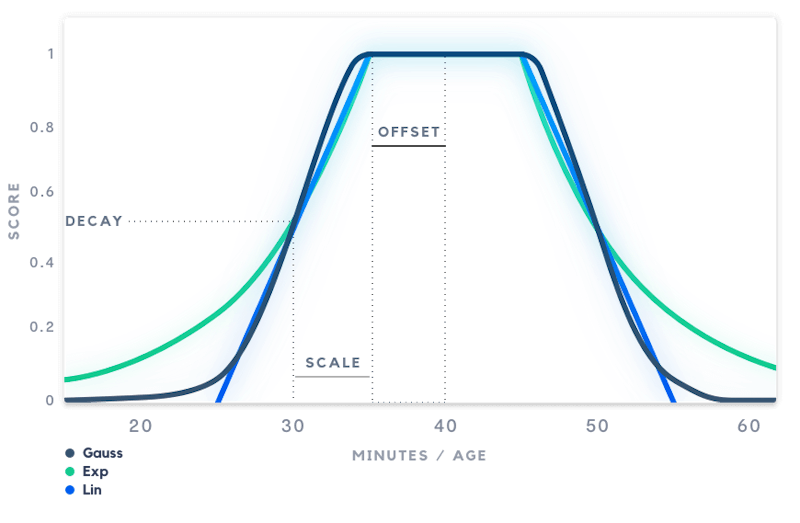
#### Parameters
| name | description | default |
| --------- | --------------------------------------------------------------------------------------------------------------------------------------------------------- | ------- |
| origin | The best possible value. If the value is equal to the origin, the decay function will return 1. | now |
| scale | Determines how quickly the score drops from 1.0 to the decay value. If the scale is set to "3d", the score will be equal to the decay value after 3 days. | 5d |
| offset | Values below the offset will start to receive a lower score. | 0 |
| decay | The score that a value at scale distance from the origin should receive. | 0.5 |
| direction | left, right or both. If right is specified, only apply the decay for the right part of the graph. | both |
You can use s, m, h, d and w to specify seconds, minutes, hours, days and weeks respectively.
The example below defines a simple_gauss with the following parameters:
- **scale**: 5 days
- **offset**: 1 day
- **decay**: 0.3
This means that an activity younger than 1 day (the offset) will return a score of 1. An activity that is exactly 6 days old (offset + scale) will get a score of 0.3 (the decay factor). The full example:
```js label="Node"
await serverClient.feeds.createFeedGroup({
id: "myid",
activity_selectors: [{ type: "following" }],
ranking: {
type: "expression",
functions: {
simple_gauss: {
base: "decay_gauss",
scale: "5d",
offset: "1d",
decay: "0.3",
},
popularity_gauss: {
base: "decay_gauss",
scale: "100",
offset: "5",
decay: "0.5",
},
},
score: "simple_gauss(time)*popularity_gauss(popularity)",
},
});
```
```go label="Go"
ctx := context.Background()
response, err := client.Feeds().CreateFeedGroup(ctx, &getstream.CreateFeedGroupRequest{
ID: "myid",
ActivitySelectors: []getstream.ActivitySelectorConfig{
{
Type: getstream.PtrTo("following"),
},
},
Ranking: &getstream.RankingConfig{
Type: getstream.PtrTo("expression"),
Score: getstream.PtrTo("simple_gauss(time)*popularity_gauss(popularity)"),
Functions: map[string]getstream.DecayFunctionConfig{
"simple_gauss": {
Base: getstream.PtrTo("decay_gauss"),
Scale: getstream.PtrTo("5d"),
Offset: getstream.PtrTo("1d"),
Decay: getstream.PtrTo("0.3"),
},
"popularity_gauss": {
Base: getstream.PtrTo("decay_gauss"),
Scale: getstream.PtrTo("100"),
Offset: getstream.PtrTo("5"),
Decay: getstream.PtrTo("0.5"),
},
},
},
})
if err != nil {
log.Fatal(err)
}
```
```php label="php"
$createResponse = $feedsClient->createFeedGroup(
new GeneratedModels\CreateFeedGroupRequest(
id: "myid",
defaultVisibility: 'public',
activitySelectors: [
new GeneratedModels\ActivitySelectorConfig(
type: 'following'
)
],
ranking: new GeneratedModels\RankingConfig(
type: 'expression',
score: 'simple_gauss(time)*popularity_gauss(popularity)',
functions: [
'simple_gauss' => [
'base' => 'decay_gauss',
'scale' => '5d',
'offset' => '1d',
'decay' => '0.3'
],
'popularity_gauss' => [
'base' => 'decay_gauss',
'scale' => '100',
'offset' => '5',
'decay' => '0.5'
]
]
)
)
);
```
```csharp label="C#"
var createResponse = await _feedsV3Client.CreateFeedGroupAsync(new CreateFeedGroupRequest
{
ID = feedGroupId,
DefaultVisibility = "public",
ActivityProcessors = new List
{
new() { Type = "default" }
}
});
```
```python label="Python"
create_response = self.client.feeds.create_feed_group(
id= feed_group_id,
default_visibility= "public",
)
```
### Interest weights
Interest weights help customize the ranking to users' interests. If you want to create a ranking expression that relies on interest weights, use `interest` type ranking.
```js label="Node"
serverClient.feeds.createFeedGroup({
id: "myid",
activity_selectors: [{ type: "following" }],
ranking: {
type: "interest",
score: "interest_score * popularity",
},
});
```
```go label="Go"
response, err := client.Feeds().CreateFeedGroup(context.Background(), &getstream.CreateFeedGroupRequest{
ID: "myid",
ActivitySelectors: []getstream.ActivitySelectorConfig{
{
Type: getstream.PtrTo("following"),
},
},
Ranking: &getstream.RankingConfig{
Type: getstream.PtrTo("interest"),
Score: getstream.PtrTo("interest_score * popularity"),
},
})
if err != nil {
log.Fatal(err)
}
```
```java label="Java"
testFeed = new Feed("user", testUserId, feeds);
testFeed2 = new Feed("user", testUserId2, feeds);
GetOrCreateFeedRequest feedRequest1 =
GetOrCreateFeedRequest.builder().userID(testUserId).build();
GetOrCreateFeedRequest feedRequest2 =
GetOrCreateFeedRequest.builder().userID(testUserId2).build();
GetOrCreateFeedResponse feedResponse1 = testFeed.getOrCreate(feedRequest1).getData();
GetOrCreateFeedResponse feedResponse2 = testFeed2.getOrCreate(feedRequest2).getData();
testFeedId = feedResponse1.getFeed().getFeed();
testFeedId2 = feedResponse2.getFeed().getFeed();
```
```php label="php"
$createResponse = $feedsClient->createFeedGroup(
new GeneratedModels\CreateFeedGroupRequest(
id: "myid",
activitySelectors: [
new GeneratedModels\ActivitySelectorConfig(
type: 'following'
)
],
ranking: new GeneratedModels\RankingConfig(
type: 'interest',
score: 'interest_score * popularity',
)
)
);
```
```csharp label="C#"
var feedResponse1 = await _feedsV3Client.GetOrCreateFeedAsync(
FeedGroupID: "user",
FeedID: _testFeedId,
request: new GetOrCreateFeedRequest { UserID = _testUserId }
);
var feedResponse2 = await _feedsV3Client.GetOrCreateFeedAsync(
FeedGroupID: "user",
FeedID: _testFeedId2,
request: new GetOrCreateFeedRequest { UserID = _testUserId2 }
);
```
```python label="Python"
feed_response_1 = self.test_feed.get_or_create(user_id=self.test_user_id)
feed_response_2 = self.test_feed_2.get_or_create(
user_id=self.test_user_id_2
)
```
`interest_score` is computed by combining activity topics and the specific user's interests. The result is a number between 0-1.
#### Activity topics
The topic of an activity can be computed automatically using [activity processors](/activity-feeds/docs/go-golang/activity-processors/) or by [setting the `interest_tags` field](/activity-feeds/docs/go-golang/activities/#overview-of-all-activity-fields) via the Stream API.
#### User interests
A user's interests are computed automatically by the Stream API from the `interest_tags` on activities the user has reacted to. When ranking with `interest` type, the top five computed tags are used, each with a weight of `1.0`.
You can also pass `interest_weights` when reading the feed. These weights are **merged** with the computed interests rather than replacing them:
- Tags that appear only in the computed profile or only in `interest_weights` both contribute to `interest_score`.
- If the same tag appears in both, the value from `interest_weights` is used (an explicit override for that tag).
- If you omit `interest_weights` or pass an empty map, ranking uses only the computed interests.
```js label="JavaScript"
await timeline.getOrCreate({
interest_weights: {
travel: 1,
food: 0.5,
exercise: -1,
},
});
```
```js label="React"
await timeline.getOrCreate({
interest_weights: {
travel: 1,
food: 0.5,
exercise: -1,
},
});
```
```js label="React Native"
await timeline.getOrCreate({
interest_weights: {
travel: 1,
food: 0.5,
exercise: -1,
},
});
```
```js label="Node"
await timeline.getOrCreate({
interest_weights: {
travel: 1,
food: 0.5,
exercise: -1,
},
user_id: "",
});
```
```go label="Go"
ctx := context.Background()
timeline := client.Feeds().Feed("timeline", "john")
timelineResponse, err := timeline.GetOrCreate(ctx, &getstream.GetOrCreateFeedRequest{
InterestWeights: map[string]float64{
"travel": 1.0,
"food": 0.5,
"exercise": -1.0,
},
UserID: getstream.PtrTo("john"),
})
if err != nil {
log.Fatal(err)
}
```
```java label="Java"
testFeed = new Feed("user", testUserId, feeds);
testFeed2 = new Feed("user", testUserId2, feeds);
GetOrCreateFeedRequest feedRequest1 =
GetOrCreateFeedRequest.builder().userID(testUserId).build();
GetOrCreateFeedRequest feedRequest2 =
GetOrCreateFeedRequest.builder().userID(testUserId2).build();
GetOrCreateFeedResponse feedResponse1 = testFeed.getOrCreate(feedRequest1).getData();
GetOrCreateFeedResponse feedResponse2 = testFeed2.getOrCreate(feedRequest2).getData();
testFeedId = feedResponse1.getFeed().getFeed();
testFeedId2 = feedResponse2.getFeed().getFeed();
```
```php label="php"
$feedResponse = $feedsClient->feed('timeline', 'john')->getOrCreateFeed(
new GeneratedModels\GetOrCreateFeedRequest(
interestWeights: [
'travel' => 1.0,
'food' => 0.5,
'exercise' => -1.0
],
userID: "john"
)
);
```
```csharp label="C#"
var feedResponse1 = await _feedsV3Client.GetOrCreateFeedAsync(
FeedGroupID: "user",
FeedID: _testFeedId,
request: new GetOrCreateFeedRequest { UserID = _testUserId }
);
var feedResponse2 = await _feedsV3Client.GetOrCreateFeedAsync(
FeedGroupID: "user",
FeedID: _testFeedId2,
request: new GetOrCreateFeedRequest { UserID = _testUserId2 }
);
```
```python label="Python"
feed_response_1 = self.test_feed.get_or_create(user_id=self.test_user_id)
feed_response_2 = self.test_feed_2.get_or_create(
user_id=self.test_user_id_2
)
```
The range for interest weights is between -1 and 1. 1 means a user is very interested in a topic.
#### Preference score
`preference_score` reflects how much an activity matches the user's preferences based on activity feedback (show more/less). Activities with `interest_tags` that have strong dislike (based on user feedback) are filtered out from the feed. Other activities are ranked using `preference_score` which incorporates the user's activity feedback.
You can use `preference_score` in your ranking expressions with both `expression` and `interest` type ranking to boost activities that match user preferences:
```js label="Node"
// Using preference_score with expression type
serverClient.feeds.createFeedGroup({
id: "myid",
activity_selectors: [{ type: "following" }],
ranking: {
type: "expression",
score: "preference_score * popularity",
},
});
// Using preference_score with interest type
serverClient.feeds.createFeedGroup({
id: "myid",
activity_selectors: [{ type: "following" }],
ranking: {
type: "interest",
score: "preference_score * interest_score * popularity",
},
});
```
```go label="Go"
// Using preference_score with expression type
response, err := client.Feeds().CreateFeedGroup(context.Background(), &getstream.CreateFeedGroupRequest{
ID: "myid",
ActivitySelectors: []getstream.ActivitySelectorConfig{
{
Type: getstream.PtrTo("following"),
},
},
Ranking: &getstream.RankingConfig{
Type: getstream.PtrTo("expression"),
Score: getstream.PtrTo("preference_score * popularity"),
},
})
// Using preference_score with interest type
response, err := client.Feeds().CreateFeedGroup(context.Background(), &getstream.CreateFeedGroupRequest{
ID: "myid",
ActivitySelectors: []getstream.ActivitySelectorConfig{
{
Type: getstream.PtrTo("following"),
},
},
Ranking: &getstream.RankingConfig{
Type: getstream.PtrTo("interest"),
Score: getstream.PtrTo("preference_score * interest_score * popularity"),
},
})
if err != nil {
log.Fatal(err)
}
```
```php label="php"
// Using preference_score with expression type
$createResponse = $feedsClient->createFeedGroup(
new GeneratedModels\CreateFeedGroupRequest(
id: "myid",
activitySelectors: [
new GeneratedModels\ActivitySelectorConfig(
type: 'following'
)
],
ranking: new GeneratedModels\RankingConfig(
type: 'expression',
score: 'preference_score * popularity',
)
)
);
// Using preference_score with interest type
$createResponse = $feedsClient->createFeedGroup(
new GeneratedModels\CreateFeedGroupRequest(
id: "myid",
activitySelectors: [
new GeneratedModels\ActivitySelectorConfig(
type: 'following'
)
],
ranking: new GeneratedModels\RankingConfig(
type: 'interest',
score: 'preference_score * interest_score * popularity',
)
)
);
```
See [Activity feedback](/activity-feeds/docs/go-golang/activity-feedback/) for more information on how users can provide feedback that affects `preference_score`.
### Ranking by Selector Source
When using multiple [activity selectors](/activity-feeds/docs/go-golang/activity-selectors/), each activity is tagged with a `selector_source` field indicating which selector provided it. This enables you to prioritize activities from specific sources in your ranking expressions.
```js label="Node"
// Example 1: Simple boost - following activities get 2x multiplier
await serverClient.feeds.createFeedGroup({
id: "timeline",
activity_selectors: [
{ type: "following" },
{ type: "popular", min_popularity: 0 },
],
ranking: {
type: "expression",
score: 'selector_source == "following" ? popularity * 2 : popularity',
defaults: {
selector_source: "", // Required when using selector_source in expressions
},
},
});
// Example 2: Multiple selectors with different bonuses
await serverClient.feeds.createFeedGroup({
id: "timeline",
activity_selectors: [
{ type: "following" },
{ type: "interest" },
{ type: "popular", min_popularity: 0 },
],
ranking: {
type: "expression",
score: `
(selector_source == "following" ? 10 : 0) +
(selector_source == "interest" ? 5 : 0) +
popularity
`,
defaults: {
selector_source: "",
},
},
});
```
```go label="Go"
// Example 1: Simple boost - following activities get 2x multiplier
_, err := client.Feeds().CreateFeedGroup(ctx, &getstream.CreateFeedGroupRequest{
ID: "timeline",
ActivitySelectors: []getstream.ActivitySelectorConfig{
{Type: getstream.PtrTo("following")},
{Type: getstream.PtrTo("popular"), MinPopularity: getstream.PtrTo(0)},
},
Ranking: &getstream.RankingConfig{
Type: getstream.PtrTo("expression"),
Score: getstream.PtrTo(`selector_source == "following" ? popularity * 2 : popularity`),
Defaults: map[string]any{
"selector_source": "",
},
},
})
// Example 2: Multiple selectors with different bonuses
_, err = client.Feeds().CreateFeedGroup(ctx, &getstream.CreateFeedGroupRequest{
ID: "timeline",
ActivitySelectors: []getstream.ActivitySelectorConfig{
{Type: getstream.PtrTo("following")},
{Type: getstream.PtrTo("interest")},
{Type: getstream.PtrTo("popular"), MinPopularity: getstream.PtrTo(0)},
},
Ranking: &getstream.RankingConfig{
Type: getstream.PtrTo("expression"),
Score: getstream.PtrTo(`
(selector_source == "following" ? 10 : 0) +
(selector_source == "interest" ? 5 : 0) +
popularity
`),
Defaults: map[string]any{
"selector_source": "",
},
},
})
```
```php label="php"
// Example 1: Simple boost - following activities get 2x multiplier
$createResponse = $feedsClient->createFeedGroup(
new GeneratedModels\CreateFeedGroupRequest(
id: 'timeline',
activitySelectors: [
new GeneratedModels\ActivitySelectorConfig(type: 'following'),
new GeneratedModels\ActivitySelectorConfig(
type: 'popular',
minPopularity: 0
)
],
ranking: new GeneratedModels\RankingConfig(
type: 'expression',
score: 'selector_source == "following" ? popularity * 2 : popularity',
defaults: (object) [
'selector_source' => ''
]
)
)
);
// Example 2: Multiple selectors with different bonuses
$createResponse = $feedsClient->createFeedGroup(
new GeneratedModels\CreateFeedGroupRequest(
id: 'timeline',
activitySelectors: [
new GeneratedModels\ActivitySelectorConfig(type: 'following'),
new GeneratedModels\ActivitySelectorConfig(type: 'interest'),
new GeneratedModels\ActivitySelectorConfig(
type: 'popular',
minPopularity: 0
)
],
ranking: new GeneratedModels\RankingConfig(
type: 'expression',
score: '
(selector_source == "following" ? 10 : 0) +
(selector_source == "interest" ? 5 : 0) +
popularity
',
defaults: (object) [
'selector_source' => ''
]
)
)
);
```
**Important notes:**
- **Defaults required:** You must provide `selector_source` in the `defaults` map (typically as an empty string `""`)
- **Duplicate activities:** If an activity matches multiple selectors, it keeps the `selector_source` of the **first selector** in your configuration
- **Valid sources:** `following`, `popular`, `interest`, `query`, `proximity`, `current_feed`, `follow_suggestion`
### Ranking by Read/Seen Status
When `track_read` or `track_seen` is enabled on a feed group, you can use `is_read` and `is_seen` as variables in ranking expressions. This lets you prioritize unread or unseen content.
Ranking by `is_read` / `is_seen` is only available on **Enterprise** plans. [Contact support](https://getstream.io/contact/) to enable this feature for your organization.
For example, to show unread notifications first and then sort by recency:
```js label="Node"
await serverClient.feeds.updateFeedGroup({
id: "notification",
ranking: {
type: "expression",
score: "(is_read ? 0 : 1000) + decay_linear(time, 72)",
},
});
```
```go label="Go"
response, err := client.Feeds().UpdateFeedGroup(ctx, "notification", &getstream.UpdateFeedGroupRequest{
Ranking: &getstream.RankingConfig{
Type: getstream.PtrTo("expression"),
Score: getstream.PtrTo("(is_read ? 0 : 1000) + decay_linear(time, 72)"),
},
})
```
```python label="Python"
client.feeds.update_feed_group(
id="notification",
ranking=RankingConfig(
type="expression",
score="(is_read ? 0 : 1000) + decay_linear(time, 72)",
),
)
```
#### Example expressions
| Expression | Effect |
| ----------------------------------------------------- | ------------------------------------------- |
| `is_read ? 0 : 100` | Unread notifications ranked first |
| `popularity - (is_read ? 10 : 0)` | Penalize read notifications by 10 points |
| `popularity - (is_read ? 10 : 0) - (is_seen ? 5 : 0)` | Penalize both read and seen notifications |
| `(is_seen ? 0 : 1000) + decay_linear(time, 48)` | Unseen notifications first, with time decay |
#### Aggregated feeds
For aggregated notification feeds, `is_read` and `is_seen` are resolved at the **group level**. All activities within an aggregated group share the same read/seen status. When a group is marked as read, all activities in that group are treated as read for ranking purposes.
Ranking by `is_read` / `is_seen` requires notification tracking to be enabled on the feed group (`track_read` / `track_seen`). If tracking is not enabled, these variables are not available in ranking expressions.
### External data
External data lets you add dynamic data to your ranking expressions. External data is provided when reading the feed, so you can provide user-specific data here.
#### Accessing external data in ranking expressions
| name | description |
| ---------- | -------------------------------------------------------------------------------------------------------------------------------------- |
| `external` | The ranking configuration provided when reading the feed, nested fields can be accessed with `.` notation, for example: `external.foo` |
```js label="Node"
serverClient.feeds.createFeedGroup({
id: "myid",
ranking: {
type: "expression",
score:
"popularity * external.popularity_multiplier + share_count * external.share_multiplier",
defaults: {
external: {
// Provide default values if external data isn't provided when reading the feed
popularity_multiplier: 1,
share_multiplier: 1,
},
},
},
});
```
```go label="Go"
createRequest := &getstream.CreateFeedGroupRequest{
ID: "myid",
ActivitySelectors: []getstream.ActivitySelectorConfig{
{
Type: getstream.PtrTo("following"),
},
},
Ranking: &getstream.RankingConfig{
Type: getstream.PtrTo("expression"),
Score: getstream.PtrTo("popularity * external.popularity_multiplier + share_count * external.share_multiplier"),
Defaults: map[string]any{
"external": map[string]any{
"popularity_multiplier": 1,
"share_multiplier": 1,
},
},
},
}
response, err := client.Feeds().CreateFeedGroup(context.Background(), createRequest)
if err != nil {
log.Fatal("Error creating feed group:", err)
}
```
```java label="Java"
testFeed = new Feed("user", testUserId, feeds);
testFeed2 = new Feed("user", testUserId2, feeds);
GetOrCreateFeedRequest feedRequest1 =
GetOrCreateFeedRequest.builder().userID(testUserId).build();
GetOrCreateFeedRequest feedRequest2 =
GetOrCreateFeedRequest.builder().userID(testUserId2).build();
GetOrCreateFeedResponse feedResponse1 = testFeed.getOrCreate(feedRequest1).getData();
GetOrCreateFeedResponse feedResponse2 = testFeed2.getOrCreate(feedRequest2).getData();
testFeedId = feedResponse1.getFeed().getFeed();
testFeedId2 = feedResponse2.getFeed().getFeed();
```
```php label="php"
$createResponse = $feedsClient->createFeedGroup(
new GeneratedModels\CreateFeedGroupRequest(
id: "myid",
activitySelectors: [
new GeneratedModels\ActivitySelectorConfig(
type: 'following'
)
],
ranking: new GeneratedModels\RankingConfig(
type: 'expression',
score: 'popularity * external.popularity_multiplier + share_count * external.share_multiplier',
defaults: (object) [
'external' => (object) [
// Provide default values if external data isn't provided when reading the feed
'popularity_multiplier' => 1.0,
'share_multiplier' => 0.5
]
]
)
)
);
```
```csharp label="C#"
var feedResponse1 = await _feedsV3Client.GetOrCreateFeedAsync(
FeedGroupID: "user",
FeedID: _testFeedId,
request: new GetOrCreateFeedRequest { UserID = _testUserId }
);
var feedResponse2 = await _feedsV3Client.GetOrCreateFeedAsync(
FeedGroupID: "user",
FeedID: _testFeedId2,
request: new GetOrCreateFeedRequest { UserID = _testUserId2 }
);
```
```python label="Python"
feed_response_1 = self.test_feed.get_or_create(user_id=self.test_user_id)
feed_response_2 = self.test_feed_2.get_or_create(
user_id=self.test_user_id_2
)
```
#### Providing external data when reading the feed
```js label="JavaScript"
await timeline.getOrCreate({
external_ranking: {
popularity_multiplier: 1, // normal weight for popularity
share_multiplier: 100, // very high boost for share_count
},
});
```
```js label="React"
await timeline.getOrCreate({
external_ranking: {
popularity_multiplier: 1, // normal weight for popularity
share_multiplier: 100, // very high boost for share_count
},
});
```
```js label="React Native"
await timeline.getOrCreate({
external_ranking: {
popularity_multiplier: 1, // normal weight for popularity
share_multiplier: 100, // very high boost for share_count
},
});
```
```js label="Node"
await timeline.getOrCreate({
external_ranking: {
popularity_multiplier: 1, // normal weight for popularity
share_multiplier: 100, // very high boost for share_count
},
user_id: "",
});
```
```go label="Go"
response, err := timeline.GetOrCreate(ctx, &getstream.GetOrCreateFeedRequest{
ActivitySelectors: []getstream.ActivitySelectorConfig{
{
Type: getstream.PtrTo("following"),
},
},
ExternalRanking: map[string]any{
"popularity_multiplier": 1,
"share_multiplier": 100,
},
UserID: getstream.PtrTo("john"),
})
if err != nil {
log.Fatal("Error getting or creating timeline:", err)
}
```
```php label="php"
$feedResponse = $feedsClient->feed('timeline', 'john')->getOrCreateFeed(
new GeneratedModels\GetOrCreateFeedRequest(
externalRanking: (object) [
'popularity_multiplier' => 1,
'share_multiplier' => 100
],
userID: "john"
)
);
```
```java label="Java"
testFeed = new Feed("user", testUserId, feeds);
testFeed2 = new Feed("user", testUserId2, feeds);
GetOrCreateFeedRequest feedRequest1 =
GetOrCreateFeedRequest.builder().userID(testUserId).build();
GetOrCreateFeedRequest feedRequest2 =
GetOrCreateFeedRequest.builder().userID(testUserId2).build();
GetOrCreateFeedResponse feedResponse1 = testFeed.getOrCreate(feedRequest1).getData();
GetOrCreateFeedResponse feedResponse2 = testFeed2.getOrCreate(feedRequest2).getData();
testFeedId = feedResponse1.getFeed().getFeed();
testFeedId2 = feedResponse2.getFeed().getFeed();
```
```csharp label="C#"
var feedResponse1 = await _feedsV3Client.GetOrCreateFeedAsync(
FeedGroupID: "user",
FeedID: _testFeedId,
request: new GetOrCreateFeedRequest { UserID = _testUserId }
);
var feedResponse2 = await _feedsV3Client.GetOrCreateFeedAsync(
FeedGroupID: "user",
FeedID: _testFeedId2,
request: new GetOrCreateFeedRequest { UserID = _testUserId2 }
);
```
```python label="Python"
feed_response_1 = self.test_feed.get_or_create(user_id=self.test_user_id)
feed_response_2 = self.test_feed_2.get_or_create(
user_id=self.test_user_id_2
)
```
### Arrays and Maps
Stream provides three powerful functions for working with arrays and maps in ranking expressions. These functions are particularly useful for creating dynamic, personalized ranking algorithms that can respond to external data.
**map_lookup(key, map)**
Looks up a single value from a map by key. If the key doesn't exist, it returns `0.0`.
```js label="Node"
await serverClient.feeds.createFeedGroup({
id: "myid",
activity_selectors: [{ type: "following" }],
ranking: {
type: "expression",
score: "popularity + map_lookup(stock, external.stock_boosts)",
defaults: {
stock: "",
externals: {
stock_boosts: {},
},
},
},
});
```
```go label="Go"
createRequest := &getstream.CreateFeedGroupRequest{
ID: "myid",
ActivitySelectors: []getstream.ActivitySelectorConfig{
{
Type: getstream.PtrTo("following"),
},
},
Ranking: &getstream.RankingConfig{
Type: getstream.PtrTo("expression"),
Score: getstream.PtrTo("popularity + map_lookup(stock, external.stock_boosts)"),
Defaults: map[string]any{
"stock": "",
"externals": map[string]any{
"stock_boosts": map[string]any{}
}
},
},
}
response, err := client.Feeds().CreateFeedGroup(context.Background(), createRequest)
if err != nil {
log.Fatal("Error creating feed group:", err)
}
```
```php label="php"
$createResponse = $feedsClient->createFeedGroup(
new GeneratedModels\CreateFeedGroupRequest(
id: "myid",
activitySelectors: [
new GeneratedModels\ActivitySelectorConfig(
type: 'following'
)
],
ranking: new GeneratedModels\RankingConfig(
type: 'expression',
score: 'popularity + map_lookup(stock, external.stock_boosts)',
defaults: (object) [
'stock' => '',
'external' => (object) [
'stock_boosts' => (object) []
]
]
)
)
);
```
Providing external data when reading the feed
```js label="JavaScript"
await timeline.getOrCreate({
external_ranking: {
stock_boosts: {
apple: 0.9,
tesla: 0.5,
microsoft: 0.3,
},
},
});
```
```js label="React"
await timeline.getOrCreate({
external_ranking: {
stock_boosts: {
apple: 0.9,
tesla: 0.5,
microsoft: 0.3,
},
},
});
```
```js label="React Native"
await timeline.getOrCreate({
external_ranking: {
stock_boosts: {
apple: 0.9,
tesla: 0.5,
microsoft: 0.3,
},
},
});
```
```js label="Node"
await timeline.getOrCreate({
external_ranking: {
stock_boosts: {
apple: 0.9,
tesla: 0.5,
microsoft: 0.3,
},
},
user_id: "",
});
```
```go label="Go"
response, err := timeline.GetOrCreate(ctx, &getstream.GetOrCreateFeedRequest{
ExternalRanking: map[string]any{
"stock_boosts": map[string]any{
"apple": 0.9,
"tesla": 0.5,
"microsoft": 0.3,
},
},
UserID: getstream.PtrTo("john"),
})
if err != nil {
log.Fatal("Error getting or creating timeline:", err)
}
```
```php label="php"
$feedResponse = $feedsClient->feed('timeline', 'john')->getOrCreateFeed(
new GeneratedModels\GetOrCreateFeedRequest(
externalRanking: (object) [
'stock_boosts' => (object) [
'apple' => 0.9,
'tesla' => 0.5,
'microsoft' => 0.3
]
],
userID: "john"
)
);
```
**sum_map_lookup(keys, map)**
Sums values from a map for multiple keys. This is useful when an activity has multiple tags or categories that should all contribute to the score.
```js label="Node"
await serverClient.feeds.createFeedGroup({
id: "myid",
activity_selectors: [{ type: "following" }],
ranking: {
type: "expression",
score: "popularity + sum_map_lookup(stocks, external.stock_boosts)",
defaults: {
stocks: [],
external: {
stock_boosts: [],
},
},
},
});
```
```go label="Go"
response, err := client.Feeds().CreateFeedGroup(context.Background(), &getstream.CreateFeedGroupRequest{
ID: "myid",
ActivitySelectors: []getstream.ActivitySelectorConfig{
{
Type: getstream.PtrTo("following"),
},
},
Ranking: &getstream.RankingConfig{
Type: getstream.PtrTo("expression"),
Score: getstream.PtrTo("popularity + sum_map_lookup(stocks, external.stock_boosts)"),
Defaults: map[string]any{
"stocks": []string{},
"external": map[string]any{
"stock_boosts": map[string]any{}
}
},
},
})
if err != nil {
log.Fatal("Error creating feed group:", err)
}
```
```php label="php"
$createResponse = $feedsClient->createFeedGroup(
new GeneratedModels\CreateFeedGroupRequest(
id: "myid",
activitySelectors: [
new GeneratedModels\ActivitySelectorConfig(
type: 'following'
)
],
ranking: new GeneratedModels\RankingConfig(
type: 'expression',
score: 'popularity + sum_map_lookup(stocks, external.stock_boosts)',
defaults: (object) [
'stocks' => [],
'external' => [
'stock_boosts' => []
]
]
)
)
);
```
Providing external data when reading the feed
```js label="JavaScript"
await timeline.getOrCreate({
external_ranking: {
stock_boosts: {
apple: 10.0,
tesla: 5.0,
microsoft: 2.0,
},
},
});
// score = popularity + 10.0 + 5.0 = popularity + 15.0 (for activity with stocks: ['apple', 'tesla'])
```
```js label="React"
await timeline.getOrCreate({
external_ranking: {
stock_boosts: {
apple: 10.0,
tesla: 5.0,
microsoft: 2.0,
},
},
});
// score = popularity + 10.0 + 5.0 = popularity + 15.0 (for activity with stocks: ['apple', 'tesla'])
```
```js label="React Native"
await timeline.getOrCreate({
external_ranking: {
stock_boosts: {
apple: 10.0,
tesla: 5.0,
microsoft: 2.0,
},
},
});
// score = popularity + 10.0 + 5.0 = popularity + 15.0 (for activity with stocks: ['apple', 'tesla'])
```
```js label="Node"
await timeline.getOrCreate({
external_ranking: {
stock_boosts: {
apple: 10.0,
tesla: 5.0,
microsoft: 2.0,
},
},
user_id: "",
});
// score = popularity + 10.0 + 5.0 = popularity + 15.0 (for activity with stocks: ['apple', 'tesla'])
```
```go label="Go"
response, err := timeline.GetOrCreate(ctx, &getstream.GetOrCreateFeedRequest{
ExternalRanking: map[string]any{
"stock_boosts": map[string]any{
"apple": 0.9,
"tesla": 0.5,
"microsoft": 0.3,
},
},
UserID: getstream.PtrTo("john"),
})
if err != nil {
log.Fatal("Error:", err)
}
// score = popularity + 10.0 + 5.0 = popularity + 15.0 (for activity with stocks: ['apple', 'tesla'])
```
```php label="php"
$feedResponse = $feedsClient->feed('timeline', 'john')->getOrCreateFeed(
new GeneratedModels\GetOrCreateFeedRequest(
externalRanking: (object) [
'stock_boosts' => (object) [
'apple' => 10.0,
'tesla' => 5.0,
'microsoft' => 2.0
]
],
userID: "john"
)
);
// score = popularity + 10.0 + 5.0 = popularity + 15.0 (for activity with stocks: ['apple', 'tesla'])
```
**in_array(needle, haystack)**
Checks if a value exists in an array. Returns `1.0` if found, `0.0` if not found.
```js label="Node"
await serverClient.feeds.createFeedGroup({
id: "myid",
activity_selectors: [{ type: "following" }],
ranking: {
type: "expression",
score: "popularity + in_array(stock, external.watchlist) * 10",
defaults: {
stock: "",
externals: {
watchlist: [],
},
},
},
});
```
```go label="Go"
createRequest := &getstream.CreateFeedGroupRequest{
ID: "myid",
Ranking: &getstream.RankingConfig{
Type: getstream.PtrTo("expression"),
Score: getstream.PtrTo("popularity + in_array(stock, external.watchlist) * 10"),
Defaults: map[string]any{
"stock": "",
"externals": map[string]any{
"watchlist": []string{}
}
},
},
}
response, err := client.Feeds().CreateFeedGroup(context.Background(), createRequest)
if err != nil {
log.Fatal("Error creating feed group:", err)
}
```
```php label="php"
$createResponse = $feedsClient->createFeedGroup(
new GeneratedModels\CreateFeedGroupRequest(
id: "myid",
ranking: new GeneratedModels\RankingConfig(
type: 'expression',
score: 'popularity + in_array(stock, external.watchlist) * 10',
defaults: (object) [
'stock' => '',
'external' => (object) [
'watchlist' => []
]
]
)
)
);
```
Providing external data when reading the feed
```js label="JavaScript"
await timeline.getOrCreate({
external_ranking: {
watchlist: ["apple", "tesla", "microsoft"],
},
});
// activities with stocks in the watchlist get a +10 boost, others get no boost.
```
```js label="React"
await timeline.getOrCreate({
external_ranking: {
watchlist: ["apple", "tesla", "microsoft"],
},
});
// activities with stocks in the watchlist get a +10 boost, others get no boost.
```
```js label="React Native"
await timeline.getOrCreate({
external_ranking: {
watchlist: ["apple", "tesla", "microsoft"],
},
});
// activities with stocks in the watchlist get a +10 boost, others get no boost.
```
```js label="Node"
await timeline.getOrCreate({
external_ranking: {
watchlist: ["apple", "tesla", "microsoft"],
},
user_id: "",
});
// activities with stocks in the watchlist get a +10 boost, others get no boost.
```
```go label="Go"
response, err := timeline.GetOrCreate(context.Background(), &getstream.GetOrCreateFeedRequest{
ExternalRanking: map[string]any{
"watchlist": []string{"apple", "tesla", "microsoft"},
},
UserID: getstream.PtrTo("john"),
})
if err != nil {
log.Fatal("Error getting or creating timeline:", err)
}
// activities with stocks in the watchlist get a +10 boost, others get no boost.
```
```php label="php"
$feedResponse = $feedsClient->feed('timeline', 'john')->getOrCreateFeed(
new GeneratedModels\GetOrCreateFeedRequest(
externalRanking: (object) [
'watchlist' => ['apple', 'tesla', 'microsoft']
],
userID: "john"
)
);
// activities with stocks in the watchlist get a +10 boost, others get no boost.
```
#### Practical Examples
**Stock Trading Feed:**
```js
score: "popularity + sum_map_lookup(stocks, external.stock_boosts) + in_array(market_sector, external.favorite_sectors) * 5";
```
**Content Categorization:**
```js
score: "popularity + in_array(category, external.preferred_categories) * 3 + map_lookup(category, external.category_weights)";
```
**Multi-tag Content:**
```js
score: "popularity + sum_map_lookup(tags, external.tag_boosts) + in_array(priority, external.high_priority_tags) * 10";
```
## Inspecting ranking variables
When reading the feed, you can access the:
- score of each activity (this is the result of the ranking expression)
- score of each aggregated group (`aggregated_activities[].score`) when using `aggregation.score_strategy`
- reaction count of each activity (the sum of all reactions)
- standard fields like `popularity` can also be observed when reading the feed
These variables can help you understand the result of the ranking expression.
```js label="JavaScript"
const feed = client.feed("timeline", "sara");
const response = await feed.getOrCreate();
console.log(response.activities[0].score);
console.log(response.activities[0].reaction_count);
console.log(response.activities[0].popularity);
```
```js label="React"
const feed = client.feed("timeline", "sara");
const response = await feed.getOrCreate();
console.log(response.activities[0].score);
console.log(response.activities[0].reaction_count);
console.log(response.activities[0].popularity);
```
```js label="React Native"
const feed = client.feed("timeline", "sara");
const response = await feed.getOrCreate();
console.log(response.activities[0].score);
console.log(response.activities[0].reaction_count);
console.log(response.activities[0].popularity);
```
```js label="Node"
const feed = client.feeds.feed("timeline", "sara");
const response = await feed.getOrCreate({ user_id: "sara" });
console.log(response.activities[0].score);
console.log(response.activities[0].reaction_count);
console.log(response.activities[0].popularity);
```
```go label="Go"
feed := client.Feeds().Feed("timeline", "john")
response, err := feed.GetOrCreate(context.Background(), &getstream.GetOrCreateFeedRequest{
UserID: getstream.PtrTo("john"),
})
if err != nil {
log.Fatal("Error getting or creating timeline:", err)
}
log.Printf("First activity score: %f", response.Data.Activities[0].Score)
log.Printf("First activity popularity: %d", response.Data.Activities[0].Popularity)
log.Printf("First activity share count: %d", response.Data.Activities[0].ReactionCount)
```
```java label="Java"
testFeed = new Feed("user", testUserId, feeds);
testFeed2 = new Feed("user", testUserId2, feeds);
GetOrCreateFeedRequest feedRequest1 =
GetOrCreateFeedRequest.builder().userID(testUserId).build();
GetOrCreateFeedRequest feedRequest2 =
GetOrCreateFeedRequest.builder().userID(testUserId2).build();
GetOrCreateFeedResponse feedResponse1 = testFeed.getOrCreate(feedRequest1).getData();
GetOrCreateFeedResponse feedResponse2 = testFeed2.getOrCreate(feedRequest2).getData();
testFeedId = feedResponse1.getFeed().getFeed();
testFeedId2 = feedResponse2.getFeed().getFeed();
```
```php label="php"
$feedResponse = $feedsClient->feed('timeline', 'john')->getOrCreateFeed(
new GeneratedModels\GetOrCreateFeedRequest(
userID: "john"
)
);
echo $feedResponse->getData()->activities[0]->score;
echo $feedResponse->getData()->activities[0]->reactionCount;
echo $feedResponse->getData()->activities[0]->popularity;
```
```csharp label="C#"
var feedResponse1 = await _feedsV3Client.GetOrCreateFeedAsync(
FeedGroupID: "user",
FeedID: _testFeedId,
request: new GetOrCreateFeedRequest { UserID = _testUserId }
);
var feedResponse2 = await _feedsV3Client.GetOrCreateFeedAsync(
FeedGroupID: "user",
FeedID: _testFeedId2,
request: new GetOrCreateFeedRequest { UserID = _testUserId2 }
);
```
```python label="Python"
feed_response_1 = self.test_feed.get_or_create(user_id=self.test_user_id)
feed_response_2 = self.test_feed_2.get_or_create(
user_id=self.test_user_id_2
)
```
Configuring ranking can be complex. Feel free to reach out to [support](https://getstream.io/contact/support/) if you have questions!
## Experimenting with ranking
Feed groups let you define what activities should be included in the feed and the ranking to sort these activities.
By default all feeds in the given group will have the same settings. However, you might want to experiment with different selectors and rankings. Feed views let you do that by overriding the group's default settings.
Note that any write operation to feed groups/views can take up to 30 seconds to propagate to all API nodes.
---
This page was last updated at 2026-05-22T16:31:48.451Z.
For the most recent version of this documentation, visit [https://getstream.io/activity-feeds/docs/go-golang/custom-ranking/](https://getstream.io/activity-feeds/docs/go-golang/custom-ranking/).